




Two hours, a half-baked idea, and one live app you can use to plan your next Colorado raft trip: flow.state.harperfabric.com
The Colorado River was running around 600 cfs the weekend before the live stream. Low enough that the hot spring halfway down our run was above the water line (hallelujah!), which is how you know it's a good day. I spent most of the float thinking about flow rates. Not in a poetic way. In a "why is this data so annoying to get to" way.
If you raft in Colorado, you already know the drill. USGS publishes gauge data for every river worth running, but it's spread across separate pages, and the number on the gauge today doesn't tell you what it'll be next weekend. To guess that, you need snowpack reports, dam release schedules, and a feel for the watershed. Right now I do most of this planning by squinting at three browser tabs.
So on Tuesday morning I got on a live stream with Austin and decided to build the app I wanted. I should say up front: I don't write code. I work on the go-to-market side at Harper. The last six months I've been shipping working apps anyway, and this is what that actually looks like when I do it in front of an audience.
The app is called Flow State. It's live at flow.state.harperfabric.com. It took about two hours. Here's how it went.
Important note before you start: my dev environment was already set up, Node, npm, Harper, GitHub. If yours isn't, ask Claude to walk you through it. If you hit roadblocks Claude can unblock you. Remember start with npm create harper@latest.
I talked the prompt out loud
The first thing worth stealing from this stream has nothing to do with code. I don't type my prompts. I dictate them, into ChatGPT specifically, because ChatGPT's voice dictation is meaningfully better than Claude's and noticeably better than the native Mac one. Then I ask ChatGPT to clean up my rambling into something I can paste into Claude Code.
On the stream, the ramble went for about three minutes. Colorado rivers. Specific gauges: Kremmling down to Ruby Horsethief on the Colorado, Numbers through the Royal Gorge on the Arkansas, the Gunnison. Why snowpack matters. How dam releases throw off the math. I didn't try to structure any of it. I just kept talking. ChatGPT structured it for me.
People watching live coding tend to assume the bar is technical. What I've learned is that the bar is being clear in your own head about what you want, and that's much easier to do out loud than at a keyboard. If you can describe the thing you wish existed to a friend at a bar, you can probably build a first version of it. That clarity, that's the hard part. The code follows.
npm create harper@latest
The prompt that went into Claude Code had one line at the top that mattered more than the rest of it combined: scaffold this with npm create harper@latest, and read the skills folder it drops in.
That command does three things you should care about even if you don't know what any of these words mean. It sets up a working Harper project on your machine with the right folder structure and config files. It drops in a skills folder, which is a set of instructions Claude Code reads so it knows how to build things the way Harper expects (where data goes, how to write resources, what the runtime needs from you). And it puts you on Harper itself, which is one process that handles your database, your API layer, real-time messaging, caching, and the actual app logic, all together.
That last bit is the one that changes what's possible for someone like me. Most of the time when a non-developer hits a wall with agentic coding, it's because the AI is trying to glue together five different products from five different companies and one of them is misconfigured. Harper collapses that into a single thing. The agent builds inside it. There's almost nothing to glue.
Around the middle of the stream, I pulled up a benchmark we ran earlier this year comparing this unified setup to a regular microservices stack. The microservices stack hit 100% error rates at 200 concurrent users. Harper held sub-millisecond response times at 2,000. The benchmark is about production performance, but the same property is why I can build this fast on a live stream. There's just less work to do when the parts are already together.
Two agents, two windows
Once Claude Code was chewing on the backend, I opened Claude Design and started a second build in parallel.
Claude Design is in open beta. It's much better at visual work than Claude Code is. So while one window scaffolded schemas, USGS connectors, and the data ingest, the other window was sketching a mobile-first React UI: river cards, sparklines, little up-or-down arrows next to a forecast number. Two agents, two problems, at the same time.
When Claude Design finished, the project came out as a zip. I handed it to Claude Code, told it to merge the design into the Harper app, and watched it rewrite the placeholder frontend it had stubbed in earlier. The merge was just another sentence I typed.
One thing got me. When I asked ChatGPT to write the prompt for Claude Design, ChatGPT went overboard and started specifying layout grids and component hierarchies. The prompt was longer than what I'd given to Claude Code for the entire backend. I pushed back and asked it to scale way down, treating the prompt like product requirements instead of design instructions. Tell the design agent what the user needs to feel and see. Don't try to design the thing yourself before you hand it off. The second version was much better.
I also forgot to put Claude Code in plan mode on my first try, and it started writing code before it had a plan, hit an error, and I had to back out and restart. If you take one tactical thing from this post, take that. Plan mode is the agentic-coding equivalent of measuring twice. Use it.
Drawing what you're building
There's a stretch in the middle of the stream where both agents are working and I'm waiting around with nothing to demo. I filled it by pulling up Block Builder, a thing I made for sketching Harper architectures.
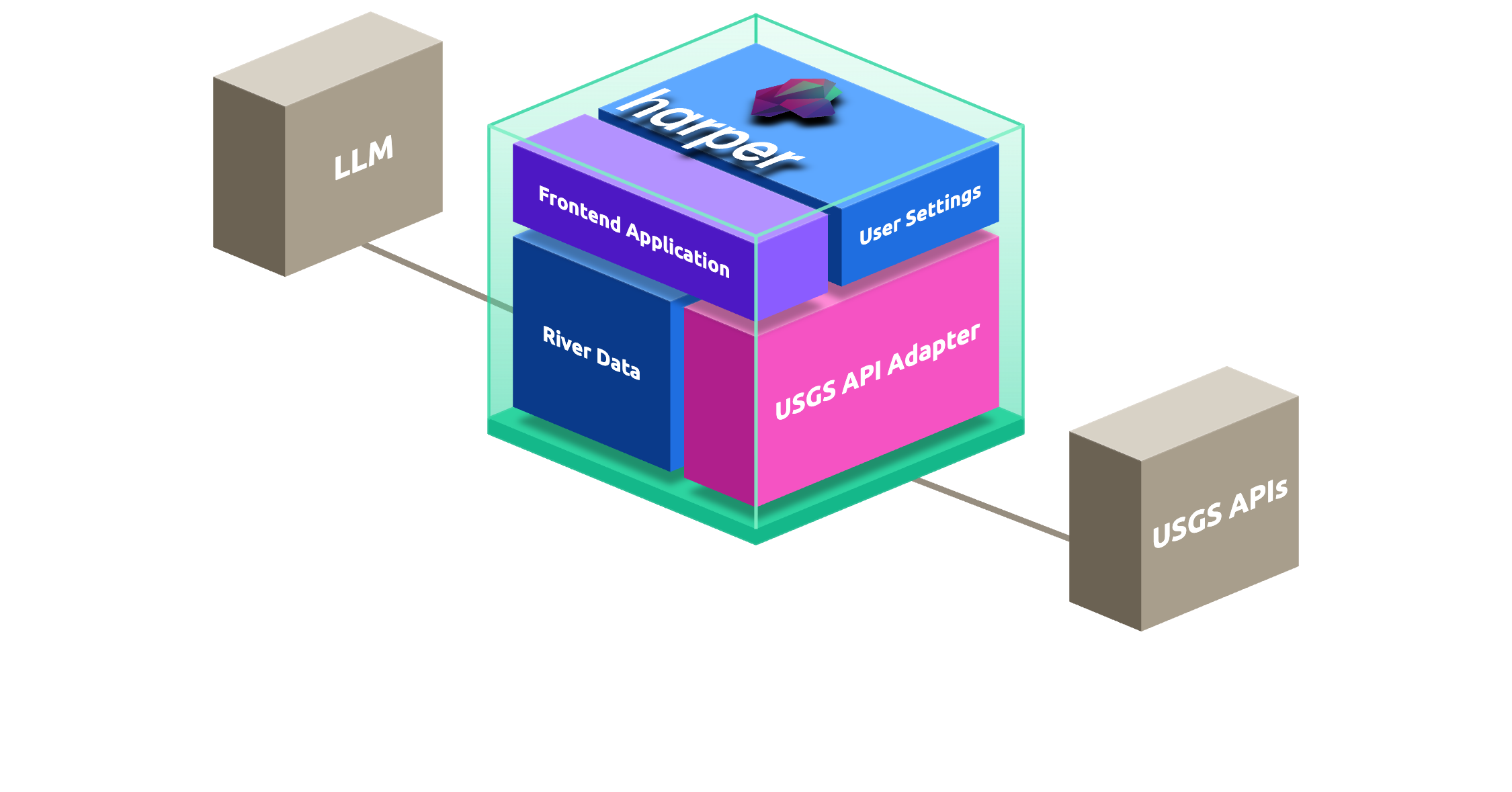
Block Builder exists because Harper doesn't fit the standard architecture diagram, the one with a bunch of separate services and arrows between them. In Harper, most of those services are inside the same box. Block Builder lets you draw what's in the box, what's outside it, and how requests move through. I mostly use it to think. A drawing of what I want is almost always a better prompt than a paragraph describing it.
Getting it onto Harper Fabric
Once the local app was up and pulling real flow data from USGS, deploying it was almost embarrassing.
I made a cluster on Fabric. I named the organization "state" and the cluster "flow," because of course I did. Free tier, no card.
I opened the .env file and put in three values: a username, a password, and the cluster's CLI target URL, which Fabric shows you in the cluster config view. Saved.
Then I told Claude Code to commit everything to GitHub and run the deploy. That was the whole deployment.
The first deploy worked, but the public URL asked anyone who visited to log in, which kind of defeated the point of a public URL. I didn't go reading docs. I typed a sentence telling Claude what was wrong. Claude poked around the resource config, figured out that REST auth was on, switched the relevant resource to allow public reads, and pushed it again. A few minutes total. There was a similar small problem with a code-generation tool that was useful in dev but shouldn't have been deployed as a Harper component. Same fix pattern: describe what's broken, let the agent un-break it.
This is the part that's genuinely different from the last time you tried to ship something. Deployment used to be where projects like mine went to die. Now it's a few more turns of conversation. And it's still running online for free. I used it today to plan my next trip.
The last five percent
Near the end of the stream I said something on camera that I've come to believe is the most honest thing about building this way: after 2 hours the app feels 95% done, but the last 5% is 95% of the effort.
Flow State has overflow on a couple of cards. The search bar is a placeholder. The agent that's supposed to do 30-day flow predictions isn't wired in yet. None of those things are hard. They're just a lot of small things, and small things take time even when an AI is doing most of the work.
But it's live. It pulls real data from real rivers. I'll be using it next weekend to decide where to put in. Real-time alerts and the prediction agent are next, and I'll build them the same way I built the first version. ChatGPT to think out loud. Claude Code and Claude Design to do the work. Harper underneath it all.
If you've been watching the agentic coding world from outside and wondering whether you can actually do this, here's where to start:
npm create harper@latest
Then open ChatGPT and tell it what you want to build. Out loud. That's most of it.
Want to show me what you built? Come find me in the Harper Discord. Docs are here if you need them (Honestly, I never use them 🤫).

.webp)




%20(1).png)
.png)


.png)