




The Tax Nobody Talks About
You've built your agent. It reasons, it retrieves, it acts. And then your cloud bill arrives.
Most teams building on LLMs treat every agent invocation as a fresh, independent transaction — a blank slate that calls the model, waits for a response, and moves on. At small scale, this is fine. At production scale, it becomes a compounding tax: on latency, on tokens, and on cost. The agent pattern that works great in a demo starts to buckle when thousands of users are running similar workflows simultaneously.
The fix isn't a better model. It's a better architecture — and the combination of Harper and Vertex AI is one of the most elegant ways to build it.
What the Problem Actually Looks Like
Consider an agent that answers product questions for an e-commerce platform. Across thousands of daily sessions:
- "What's your return policy?" gets asked ~400 times a day
- "Do you ship to Canada?" another ~200 times
- Hundreds of variations of "How do I track my order?"
With a naive architecture, each of those is a full round-trip: embed the query, retrieve context, construct a prompt, call Gemini, stream a response. You're paying for tokens and waiting on latency every single time — even though the semantically correct answer hasn't changed since yesterday.
This is the problem semantic caching solves. And it's where Harper and Vertex AI fit together almost perfectly.
What Each Piece Brings
Vertex AI
Vertex AI is Google Cloud's managed ML platform, and for agent architectures it offers two things that matter most:
Gemini models — A tiered family ranging from Gemini Flash (fast, cheap, ideal for structured retrieval and summarization tasks) to Gemini Pro (deeper reasoning, more context). For agents, the tier selection is itself a performance optimization: route simple queries to Flash, complex ones to Pro.
Text Embeddings API — text-embedding-004 produces 768-dimension embeddings optimized for semantic similarity. This is the input to the caching layer: embed the incoming query, hand the vector to Harper, and let Harper decide whether to serve a cached response or call the model fresh.
Harper
Harper is a distributed data platform that combines a database, cache, and application server into a single deployable unit. For agent architectures, three characteristics matter:
Native HNSW vector index — Harper indexes vector fields using HNSW (Hierarchical Navigable Small World), a best-in-class approximate nearest-neighbor algorithm. Declare a field as [Float] @indexed(type: "HNSW", distance: "cosine") in your schema and Harper handles the index automatically. Similarity search is a first-class query operation — no external vector database, no extra network hop.
Low-latency, in-memory access — Harper's storage engine keeps hot data in memory and flushes to disk asynchronously. Cache reads are sub-millisecond. For an agent that otherwise waits 1–3 seconds per LLM call, serving a cached response from Harper is an order-of-magnitude latency improvement.
Edge-deployable — Harper runs at the edge, close to your users. This matters for multi-region agent deployments where you want to serve cached responses from the nearest node rather than round-tripping to a central cloud region.
Components (server-side logic) — Harper's v5 component model lets you run Node.js logic directly alongside your data using Fastify routes. Your cache lookup and store logic live inside a Harper component — no extra network hops in your hot path.
The Core Architecture: Semantic Caching
Here's the pattern. When an agent receives a user query:
1. Embed the incoming query (Vertex AI Embeddings)
2. Search Harper's HNSW index for the nearest cached entry
3a. Cache hit (similarity > threshold): return cached response immediately
3b. Cache miss: call Vertex AI (Gemini), store response + embedding in Harper, return response
The division of labor is clean: Vertex AI generates embeddings and runs the LLM; Harper owns the vector index, the similarity search, and the response store.
Schema Definition
Harper's vector index is defined in schema.graphql:
type SemanticCache @table(expiration: 604800) @export {
  id: ID @primaryKey
  question: String
  answer: String
  embedding: [Float] @indexed(type: "HNSW", distance: "cosine")
  model: String
  generatedAt: Long
}
@indexed(type: "HNSW", distance: "cosine") creates the vector index automatically. @table(expiration: 604800) sets a 7-day TTL at the table level — no need to manage expires_at fields manually. @export makes the table accessible via Harper's REST API.
The Python Cache Client
This class wraps the embed → lookup → store cycle on the orchestrator side:
# semantic_cache.py
import hashlib
import httpx
import vertexai
from dataclasses import dataclass
from vertexai.language_models import TextEmbeddingModel

@dataclass
class CacheEntry:
    question: str
    answer: str
    model: str
    similarity: float

class SemanticCache:
    def __init__(
        self,
        harper_url: str,
        harper_token: str,
        gcp_project: str,
        location: str = "us-central1",
        threshold: float = 0.92,
    ):
        vertexai.init(project=gcp_project, location=location)
        self.embed_model = TextEmbeddingModel.from_pretrained("text-embedding-004")
        self.harper_url = harper_url
        self.headers = {
            "Authorization": f"Basic {harper_token}",
            "Content-Type": "application/json",
        }
        self.threshold = threshold

    def embed(self, text: str) -> list[float]:
        return self.embed_model.get_embeddings([text])[0].values

    async def lookup(self, embedding: list[float]) -> CacheEntry | None:
        async with httpx.AsyncClient() as client:
            resp = await client.post(
                f"{self.harper_url}/semantic-cache/lookup",
                headers=self.headers,
                json={"embedding": embedding, "threshold": self.threshold},
            )
            resp.raise_for_status()
            data = resp.json()

        if data.get("result"):
            r = data["result"]
            return CacheEntry(
                question=r["question"],
                answer=r["answer"],
                model=r["model"],
                similarity=data["similarity"],
            )
        return None

    async def store(
        self, question: str, embedding: list[float], answer: str, model: str
    ) -> None:
        async with httpx.AsyncClient() as client:
            await client.post(
                f"{self.harper_url}/semantic-cache/store",
                headers=self.headers,
                json={
                    "id": hashlib.sha256(question.encode()).hexdigest(),
                    "question": question,
                    "answer": answer,
                    "embedding": embedding,
                    "model": model,
                },
            )
Wiring It Into the Agent
# agent.py
from vertexai.generative_models import GenerativeModel
from semantic_cache import SemanticCache

cache = SemanticCache(
    harper_url="https://your-instance.harperdbcloud.com",
    harper_token="your-token",
    gcp_project="your-gcp-project",
    threshold=0.92,
)

gemini = GenerativeModel("gemini-2.0-flash-001")

async def run_agent(user_input: str) -> dict:
    embedding = cache.embed(user_input)

    hit = await cache.lookup(embedding)
    if hit:
        return {
            "response": hit.answer,
            "source": "cache",
            "similarity": round(hit.similarity, 4),
            "model": hit.model,
        }

    response = gemini.generate_content(user_input)
    answer = response.text

    await cache.store(user_input, embedding, answer, "gemini-2.0-flash-001")

    return {
        "response": answer,
        "source": "model",
        "similarity": None,
        "model": "gemini-2.0-flash-001",
    }
The source field is important — log it. Cache hit rates are invisible otherwise, and hit rate is the metric that tells you whether your threshold is tuned right.
The Harper Component: Vector Search Server-Side
The lookup runs inside Harper as a component, co-located with the HNSW index. Harper's search() with a vector sort target performs the nearest-neighbor lookup natively — no manual cosine similarity math, no in-process iteration over stored vectors.
Configure the component to serve Fastify routes:
# config.yaml — Harper component root
fastifyRoutes:
  files: routes/*.js
// routes/cache.js
import { tables } from 'harper';

export default async (server) => {

  // POST /lookup
  server.route({
    url: '/lookup',
    method: 'POST',
    handler: async (request) => {
      const { embedding, threshold = 0.92 } = request.body;

      const results = tables.SemanticCache.search({
        sort: { attribute: 'embedding', target: embedding },
        limit: 1,
        select: ['id', 'question', 'answer', 'model', '$distance'],
      });

      for await (const cached of results) {
        const similarity = 1 - cached.$distance;
        if (similarity >= threshold) {
          return { result: cached, similarity };
        }
      }

      return { result: null };
    },
  });

  // POST /store
  server.route({
    url: '/store',
    method: 'POST',
    handler: async (request) => {
      const { id, question, answer, embedding, model } = request.body;

      await tables.SemanticCache.put({
        id,
        question,
        answer,
        embedding,
        model,
        generatedAt: Date.now(),
      });

      return { success: true };
    },
  });

};
search() returns results sorted by cosine distance via the HNSW index. $distance is the raw distance value; 1 - $distance gives you cosine similarity. With limit: 1, Harper returns only the closest match — if it clears the threshold, it's a hit.
Compare this to a hand-rolled similarity implementation: no 500-entry fetch, no in-process loop, no numpy dependency. Harper's index does the work.
Threshold Tuning
The similarity threshold is the single most important tuning parameter. Too low and you return wrong cached answers. Too high and you miss cache opportunities.
A good starting strategy:
- Start at 0.95 and log misses for a week
- If you're seeing near-duplicate misses, drop to 0.92
- For high-stakes domains (medical, legal, financial), stay at 0.97+
- Semantically equivalent questions typically score above 0.95; genuinely different ones fall below 0.85 — the gap between those is your working range
Cache Invalidation
Semantic caches have a different invalidation model than key-value caches. You can't just bust a key — you need to invalidate semantically related entries.
- TTL-based: Already handled —
@table(expiration: 604800)in the schema enforces a 7-day TTL automatically. Adjust per domain. - Tag-based: Attach topic tags to cached entries (e.g.,
["shipping", "returns"]). When your product policy changes, delete all entries where tags containreturns. - Embedding-drift detection: When you upgrade your embedding model, re-embed a sample of cached queries and compare to stored vectors. Significant drift means your cached embeddings are misaligned — wipe and rebuild.
Token Efficiency: The Math
Let's make the benefit concrete. Say your agent handles 10,000 queries per day. Average query + context is 800 input tokens; average response is 400 output tokens.
Using Gemini 2.0 Flash pricing as a reference point:
An 80% cache hit rate — realistic for a focused domain like customer support — cuts your LLM spend by 80%. That's not a marginal gain; it's a structural change to your unit economics.
Context Compression as a Second Lever
Beyond response caching, Harper enables a second token efficiency pattern: storing compressed conversation summaries.
Instead of passing full conversation history to the model on every turn (which grows unboundedly), store a rolling summary in Harper:
# context_store.py
async def get_compressed_context(session_id: str, cache: SemanticCache) -> str:
    async with httpx.AsyncClient() as client:
        resp = await client.get(
            f"{cache.harper_url}/semantic-cache/context/{session_id}",
            headers=cache.headers,
        )
        if resp.status_code == 200:
            return resp.json().get("summary", "")
    return ""

async def update_context_summary(
    session_id: str,
    new_exchange: str,
    cache: SemanticCache,
) -> None:
    existing = await get_compressed_context(session_id, cache)

    compressor = GenerativeModel("gemini-2.0-flash-001")
    prompt = f"""
    Existing summary: {existing}
    New exchange: {new_exchange}
    Produce a concise updated summary (max 200 words) capturing all key facts.
    """
    updated = compressor.generate_content(prompt).text

    async with httpx.AsyncClient() as client:
        await client.post(
            f"{cache.harper_url}/semantic-cache/context/{session_id}",
            headers=cache.headers,
            json={"summary": updated, "updatedAt": int(time.time())},
        )
On each turn you inject the summary (~150 tokens) instead of the full history (potentially 2,000+ tokens). The compression call itself uses Gemini Flash at minimal cost. For long-running agent sessions, this alone can cut per-turn token usage by 60–70%.
Performance Architecture
The Latency Profile
A typical agent round-trip without caching:
Embed query:        ~80ms   (Vertex AI Embeddings API)
LLM call:         ~1,200ms  (Gemini Pro, streaming)
Total:            ~1,280ms
With semantic caching via Harper:
Embed query:        ~80ms   (Vertex AI Embeddings API)
Harper HNSW search:  ~2ms   (in-memory vector index)
Cache hit return:    ~5ms   (network + serialization)
Total (hit):        ~87ms
That's a 15× latency improvement on cache hits. For multi-step agents where each step compounds latency, this becomes the difference between a 2-second workflow and a 30-second one.
Reference Architecture
Putting it all together:
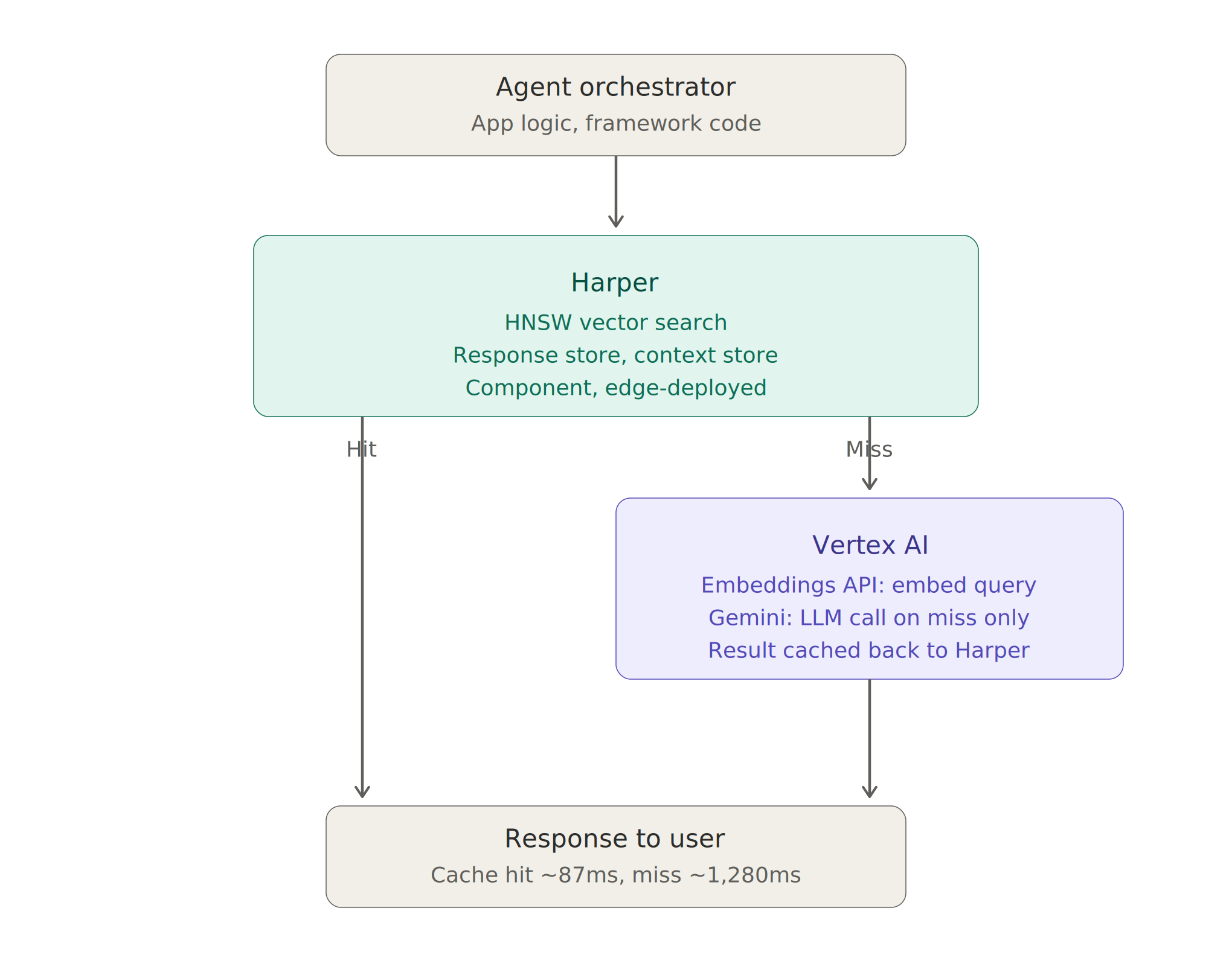
Harper owns the hot path and the data layer: vector search, response storage, conversation context. Vertex AI owns the model layer: embedding generation and LLM inference. The orchestrator routes between them.
When to Use This Pattern
This architecture pays off most when:
- Your query space has natural clustering — customer support, internal knowledge bases, FAQ-style agents. High semantic overlap = high cache hit rates.
- You're operating at scale — the infrastructure overhead only makes sense if you have enough volume to realize the token savings.
- Latency is user-facing — if a human is waiting for a response, the 15× latency improvement is viscerally noticeable.
It's overkill for:
- Exploratory research agents where every query is unique by design
- Low-volume internal tooling where token costs aren't material
- Use cases where response freshness is critical and TTLs would be near-zero anyway
The Bigger Picture
Most agent architectures are designed around the model. The model is the centerpiece; everything else is scaffolding. This works at small scale.
At production scale, the model becomes one component among several — and the data layer is where the real performance and efficiency work happens. Harper gives you a data layer that was built for speed, native vector search, and edge deployment. Vertex AI gives you a model layer that scales managed. The two together give you a production agent stack that doesn't just work — it works economically.
The teams building the most efficient agents in 2026 aren't necessarily the ones using the best models. They're the ones who figured out that the best model call is the one you don't have to make.

.webp)





%20(1).png)
.png)


.png)