
BENCHMARK
Up to 14× faster than Vercel on live data


.png)












.png)

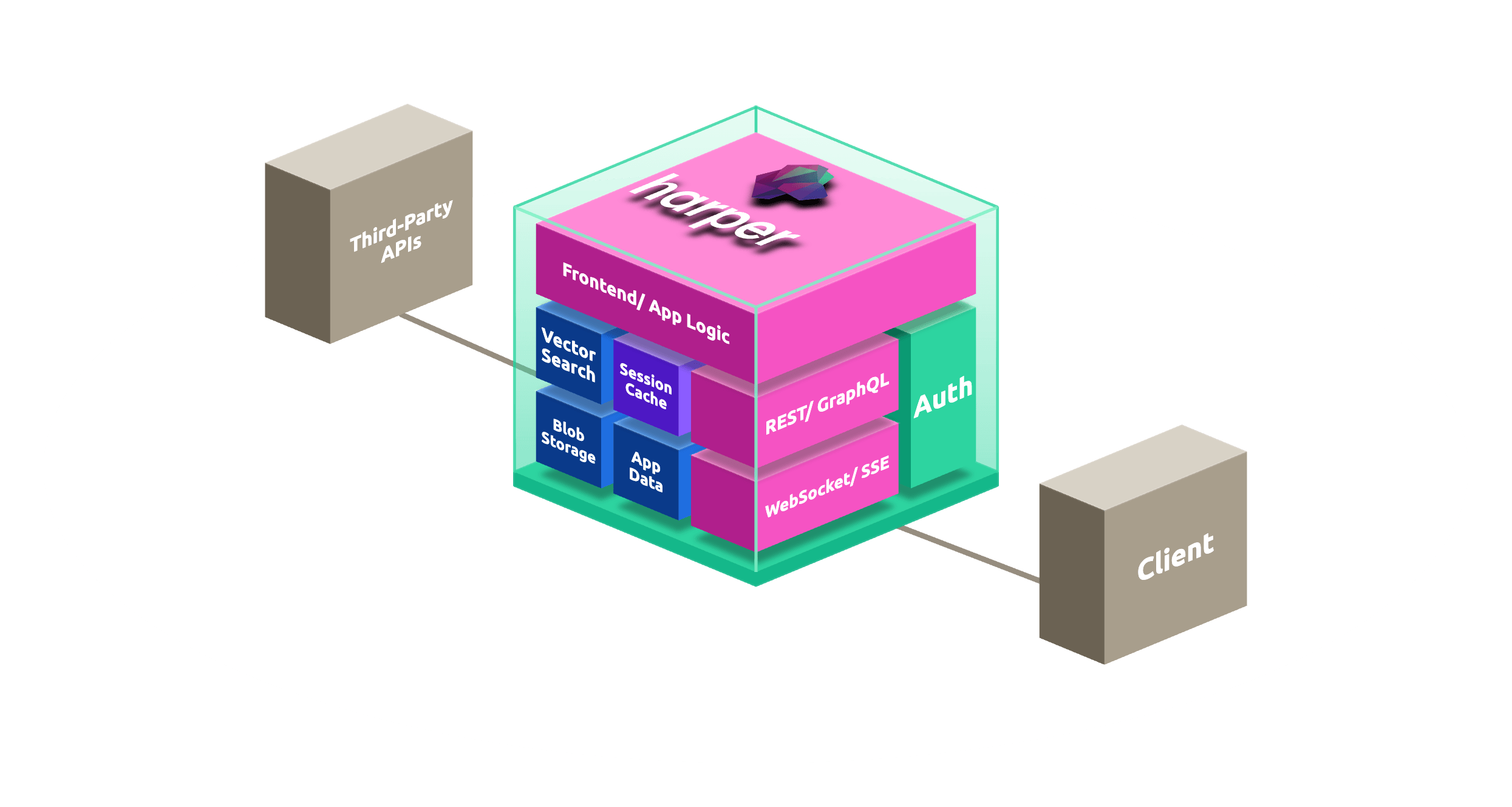
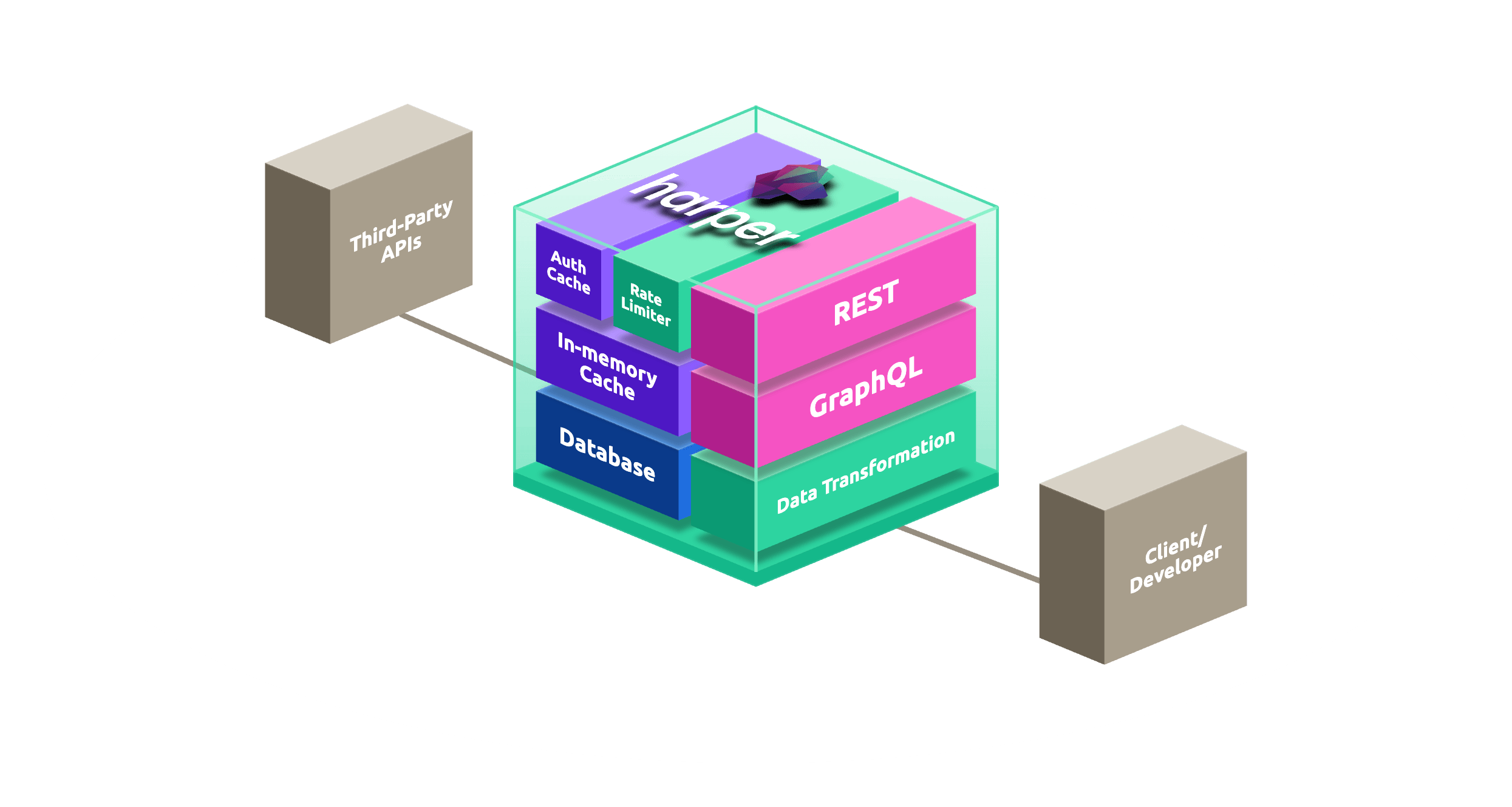
# schema.graphql

type Product @table @export {
  sku:         ID       @primaryKey   # natural key, e.g. "JKT-001"
  name:        String
  description: String
  price:       Float
  listPrice:   Float                  # original price, for sale badges
  stock:       Int
  status:      String                 # active | discontinued
  embedding:   [Float]  @embed(source: "description", model: "default")   # auto-computed + HNSW-indexed on write
  image:       Blob
  category:    Category @relationship(from: categoryId)
  categoryId:  ID       @indexed
}

type Category @table @export {
  id:   ID     @primaryKey
  name: String @indexed
  slug: String @indexed
}

// You immediately get:
GET     /Product/{sku}
POST    /Product/
PUT     /Product/{sku}
PATCH   /Product/{sku}
DELETE  /Product/{sku}
GET     /Product/?category.slug=outerwear&sort(-price)

GET     /Category/{id}
POST    /Category/
...

// No migrations. No REST framework. No code generation step.// 1. Add data, as much as you want.
POST /Category/
Content-Type: application/json
{
"name": "Outerwear",
"slug": "outerwear"
}
POST /Product/
Content-Type: application/json
{
"sku": "JKT-001",
"name": "All-Weather Shell Jacket",
"description": "Waterproof, packable, seam-sealed",
"price": 149.00,
"listPrice": 199.00,
"stock": 42,
"status": "active",
"categoryId": "<copy id from POST /Category/>"
}
// 2. Filter, sort, and traverse relationships in the address bar.
// In-stock products under $150, priced high to low
GET /Product/?price=lt=150&stock=gt=0&sort(-price)&limit(20)
// Category is Outerwear OR Footwear
GET /Product/?(category.slug=outerwear|category.slug=footwear)
// Join through the category relationship
GET /Product/?category.slug=outerwear&select(name,price,category{name,slug})
// fetch, same filters, works anywhere JS runs
const res = await fetch(
'/Product/?status=active&stock=gt=0&select(sku,name,price)',
);
const products = await res.json();
// GraphQL, enable with one line in config.yaml, query /graphql
{
Product(status: "active") {
sku
name
price
category {
name
slug
}
}
}// resources.js
import { tables } from 'harper';
const { Product } = tables;
export class StorefrontProduct extends Product {
// Enrich every GET with computed merchandising fields
static async get(target) {
const product = await super.get(target);
return {
...product,
onSale: product.price < product.listPrice,
savingsPct: product.listPrice > product.price
? Math.round((1 - product.price / product.listPrice) * 100)
: 0,
availability: product.stock > 10 ? 'in_stock'
: product.stock > 0 ? 'low_stock'
: 'out_of_stock',
};
}
// Validate and set defaults on every POST.
// Set statusCode on the error to return a 400.
static async post(target, data) {
if (!data.name) {
const error = new Error('Product name is required');
error.statusCode = 400;
throw error;
}
if (data.price == null) {
const error = new Error('Product price is required');
error.statusCode = 400;
throw error;
}
data.status = data.status ?? 'active';
data.stock = data.stock ?? 0;
return super.post(target, data);
}
}
// Three files. That's still the whole backend.// in # schema.graphql, live prices cached for 60 seconds
type LivePrice @table(expiration: 60) @export {
id: ID @primaryKey # sku
price: Float
stock: Int
}
// in resources.js, source it from your pricing or ERP service
import { tables, Resource } from 'harper';
// The cache source: a Resource subclass; get() reads the record id.
class PricingService extends Resource {
async get() {
const res = await fetch(`https://pricing.internal/v2/sku/${this.getId()}`);
return res.json(); // { price, stock }
}
};
tables.LivePrice.sourcedFrom(PricingService);
// Cache miss: one call to the pricing service, result cached for 60s
GET /LivePrice/JKT-001
// Cache hit: served from memory in <1ms. Stampede protection means a
// thousand concurrent requests trigger one upstream fetch, not a thousand.
GET -H 'If-None-Match: "<ETag>"' /LivePrice/JKT-001// 3 ways to push live inventory and price changes.
// OPTION 1 | Server-Sent Events (SSE), no library needed
const events = new EventSource('/Product/JKT-001');
events.onmessage = (e) => {
const product = JSON.parse(e.data).value;
updatePriceTag(product.price, product.stock);
// "2 left" badges and price drops update live, no polling
};
// OPTION 2 | WebSocket with custom actions via resources.js
import { tables } from 'harper';
// Extend the Product table: connecting to /LiveProduct/{sku}
// subscribes to that product's changes.
export class LiveProduct extends tables.Product {
async *connect(incomingMessages) {
for await (const msg of incomingMessages) {
if (msg.action === 'watch') yield { watching: msg.sku };
}
}
}
// OPTION 3 | config.yaml, enable MQTT for warehouse and POS stock feeds
mqtt:
network:
port: 1883
webSocket: true
requireAuthentication: true// Declared in schema.graphql (Tab 1: Schema):
// embedding: [Float] @embed(source: "description", model: "default")
// Harper computes the vector and updates the HNSW index on every write.
// The "default" model is configured once in harper-config.yaml, and is used by
// both @embed (write) and models.embed (query) — swapping providers is config,
// not code:
//
// models:
// embedding:
// default:
// backend: ollama
// model: nomic-embed-text:latest
// Store a product — send text only, no embedding step in your app
await fetch('/Product/', {
method: 'POST',
body: JSON.stringify({
sku: 'JKT-002',
name: 'Packable Down Puffer',
description: 'Lightweight insulated jacket for cold, dry weather',
price: 129.00,
listPrice: 129.00,
stock: 18,
status: 'active',
}),
});
// Open-text search: embed the shopper's query with the same model, then rank.
import { models, tables } from 'harper';
// models.embed uses the configured "default" model — no external service.
const [queryVector] = await models.embed('warm coat for winter', {
inputType: 'query',
});
const results = tables.Product.search({
select: ['sku', 'name', 'price', '$distance'],
sort: { attribute: 'embedding', target: queryVector },
limit: 5,
});
// Ranked by cosine similarity, not keyword match. "warm coat" finds the puffer.image field in your schema is a native Blob. Upload and serve product photos from the same endpoint as your data, no S3 bucket, no file service.// Already declared in schema.graphql (Tab 1: Schema):
// image: Blob
// Upload a product image
PUT /Product/JKT-001/image
Content-Type: image/jpeg
< ./shell-jacket.jpg
// Retrieve, streams back with the correct Content-Type
GET /Product/JKT-001.image
// Upload straight from a browser file input
const file = fileInput.files[0];
// the File's type sets the Content-Type automatically
await fetch('/Product/JKT-001/image', {
method: 'PUT',
body: file,
});# Develop locally
harper dev .
# Log in once to store an auth token for later commands
harper login "https://your-store.fabric.harper.fast/"
# Deploy your local project to Fabric (push-based)
cd catalog
harper deploy . \
project=catalog \
target="https://your-store.fabric.harper.fast/" \
restart=rolling \
replicated=true
# Or deploy straight from GitHub (pull-based)
harper deploy \
project=catalog \
package="https://github.com/your-org/catalog" \
target="https://your-store.fabric.harper.fast/" \
restart=rolling \
replicated=true
# For CI/CD, authenticate with env vars:
# export HARPER_CLI_USERNAME=your-cluster-username
# export HARPER_CLI_PASSWORD=your-cluster-password
# Same API. Same schema. Same logic. Now in every region.
GET https://your-store.fabric.harper.fast/Product/?category.slug=outerwear&stock=gt=0
# No Dockerfile. No cloud console wizards.
# All your files, one command, globally distributed.



.png)


.png)


%20(1).png)
