




A single firewall rule change might touch Cisco, Juniper and gear from three other vendors. Each has its own steps, rollback plan, and owner. Those instructions live in a Method of Procedure (MOP): a PDF on a shared drive, a wiki page, or a document maintained by the engineer who knows the system best.
That gets harder to manage as teams merge, responsibilities change, and networks grow. Engineers need to find the current procedure, understand what it affects, get approval, and carry out the work. When documents, tickets and scripts drift apart, a routine change becomes a coordination project.
A MOP application connects those pieces. On Harper, teams can build the portal, procedure data, APIs, and workflow logic on a unified runtime—spending less time assembling infrastructure and more time on the change process itself.
From executive request to working prototype in three days
One of our major US telecom customers was asked to find a better way to manage network change after a nationwide outage. The team received the request in an executive meeting on Wednesday, built a working MOP application prototype on Harper with AI coding tools on Thursday, and demonstrated it to executives on Friday. Leadership approved moving forward, and the application entered rollout.
The team started with a portal for vendor procedures and used an AI assistant to help turn documents into workflows. An engineer could provide a vendor document, review the proposed steps, and decide where approvals belonged. A working prototype gave the team something concrete to demonstrate and improve as it moved toward production.
That is the opportunity: start with a specific operational problem, build an application around it, and iterate. A unified platform makes it easier to focus that effort on procedures and workflows instead of setting up separate infrastructure tiers.
What a MOP application needs to do
A MOP defines the steps for making a change: prerequisites, execution, validation, and rollback. Change management provides the surrounding process: who approves it, when it runs, who gets notified, and what gets recorded. A useful application brings these capabilities together:
- Store and find procedures. Keep vendor documents, procedure versions, scripts, and owners in a searchable home.
- Map known dependencies. Connect each change to the devices and services it touches, using maintained inventory and dependency data.
- Route approvals. Get the right people to sign off on a specific procedure version, target set, and maintenance window.
- Execute and validate. Run tested scripts or API calls in stages, check the results, and stop when a check fails.
- Record and recover. Preserve approvals and per-target outcomes, with a tested rollback or recovery path when something goes wrong.
Many teams already have parts of this: a ticketing tool, a wiki, and an automation repository. The application connects them into a repeatable workflow. The architecture determines how much infrastructure the team needs to assemble and operate along the way.
Three ways to build it
1. Assemble a modular stack
One approach is to choose a product or framework for each function: a web front end, API layer, database, cache, messaging, search, approvals, and execution. The diagram shows an illustrative stack, with recognizable alternatives in each category.
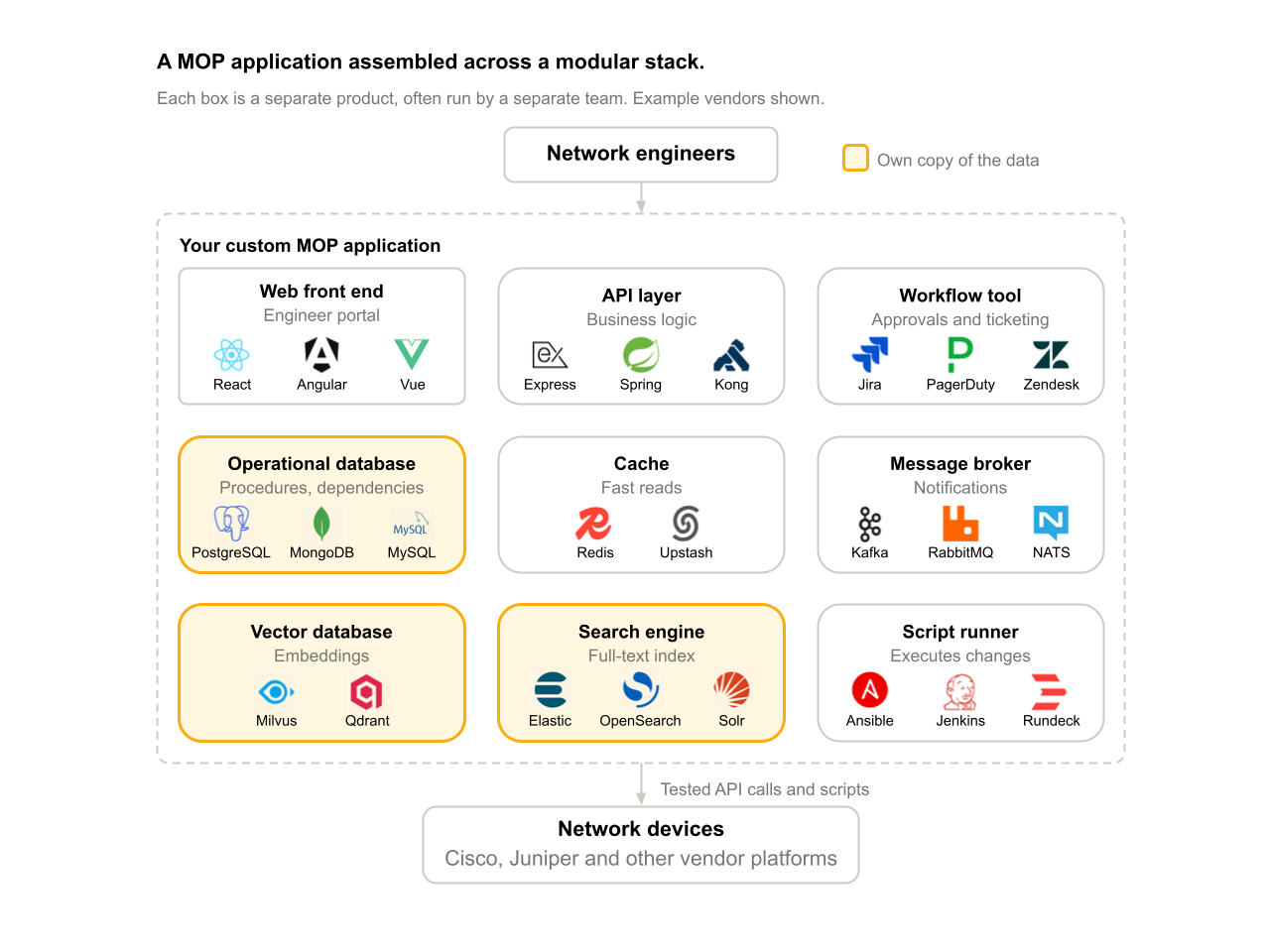
This can be a good fit when the budget and teams to operate them are large and already in place. But each service boundary adds work: connecting APIs, configuring access, monitoring failures, and keeping records and indexes current. Separate operational, vector, and text-search services may also need pipelines to keep their views of a procedure aligned.
2. Build the application on Harper
Harper brings application logic, APIs, data, caching, search capabilities, and messaging into one runtime. The same MOP application can serve the engineer’s portal, store procedure records, query dependencies, and publish workflow events without introducing a separate service for each function.
.png)
This removes a category of development effort, allowing smaller teams to deliver robust solutions. Instead of first wiring together a database, cache, message broker and search services, the team can work directly on the application figuring out how procedures are modeled, who reviews them, what gets executed and how results are checked.
The custom work is specific to the operation: approval rules, device adapters, validated scripts and recovery behavior. Harper provides a common foundation for that work, which also helps an AI coding assistant build and change the application further improving operational efficiency.
This approach fits new applications and teams looking to consolidate infrastructure. Procedure data and its configured indexes live on the same platform, reducing the separate pipelines the team would have had to maintain with a modular stack.
3. Start alongside existing systems
You do not have to replace the ticketing system, inventory database, or existing automation tools to get started. Harper can sit alongside them as a standardized application and access layer. Custom adapters bring the relevant context into the MOP workflow and send authorized updates back to the systems that own it.
.png)
For example, the existing ticketing system can remain the authority for approval while the Harper application brings together the procedure, dependency context, and execution results. Existing automation tools can continue to run validated changes. This gives a team a way to start with one workflow and expand without committing to a broad migration.
From a vendor document to a controlled change
Consider the firewall example again. The desired policy is shared across vendors, but each platform implements it differently. A MOP application coordinates that work through a repeatable sequence:
- Prepare. An engineer selects the current vendor procedure. An AI assistant can draft structured steps, prerequisites, checks, and rollback instructions for review.
- Check and approve. The application brings in known dependencies and current device context. The owner reviews the target set and routes the procedure through the agreed approval process.
- Execute in stages. Tested scripts or APIs apply the change to a limited target set first. Post-change checks determine whether the workflow can continue.
- Record the outcome. The application retains per-target results and approval history. If a check fails, execution stops, and the owner follows the validated recovery plan.
This gives an engineer a consistent process across vendor platforms and leaves a record of what happened. Dependency checks rely on maintained inventory and topology data, so the application should make missing or stale context visible before approval.
Make procedures searchable and useful to AI
Engineers look for procedures in different ways. Sometimes they know the device or ticket number. Sometimes they know only what they need to accomplish. A MOP application benefits from three complementary retrieval methods:
- Semantic retrieval finds procedures by intent. With an embedding model and schema configured, Harper can generate embeddings and index them for vector search.
- Text search finds terms within procedure content. Exact device IDs, IP addresses and ticket numbers can also be stored in structured fields for explicit matching.
- Structured queries connect procedures, dependencies, approvals, and history—for example, “Which open changes touch this router?”
Keeping those records and configured indexes in the same platform simplifies how the application retrieves context. An AI assistant can use that context to help draft a procedure or answer an engineer’s question, with source documents and versions available for review.
Start with one change type
You do not need to load every document or automate every workflow on day one. Pick a frequent, well-understood change with a clear owner. Gather a few representative MOPs and agree on a reusable template: prerequisites, targets, steps, checks, rollback, and approvers.
Make those procedures searchable first. Then connect approvals and notifications. Test execution and recovery outside production before moving to a limited pilot. Measure preparation time, manual handoffs, approval turnaround, and the effort needed to assemble the change record. Track failures and recovery outcomes as the workflow matures.
A delivery partner can help map the process, build adapters, and validate the workflow with the operations team. The first application then becomes a starting point for the next change type, with reusable patterns for data access, review, and execution.
Build a demo with your AI coding agent
Scaffold a Harper application locally:
npm create harper@latest
Give your coding agent a few sample or sanitized MOPs and describe the first change type. Have it model the procedure, configure search, and add a review-and-approval flow. Use simulated execution to test the workflow before connecting live systems.
Deploy a demo on Harper Fabric, or talk to us about running Harper on your own infrastructure and how it can operate when systems are offline. Fabric offers a free tier within its published limits; LLM model usage and development effort may have separate costs.
Bring us one recurring change type and a few representative procedures. We can help you explore how to connect them into an application—and where Harper can simplify the stack behind it.
Technical references: Harper getting started · Schema and indexing · Model configuration · Fabric pricing

.webp)




%20(1).png)
.png)


.png)