


Click Below to Get the Code

Browse, clone, and build from real-world templates powered by Harper.
Comparison
GitHub Logo

Harper vs. AWS IoT Core: Why Unified Architectures Win for Real-Time Systems

Harper’s unified application platform fuses MQTT, database storage, and real-time logic into one high-performance runtime—eliminating AWS service sprawl, IAM complexity, and Lambda overhead. For real-time systems, Harper delivers simpler architectures, lower latency, reduced costs, and faster developer velocity compared to fragmented AWS IoT Core solutions.
Comparison

Harper vs. AWS IoT Core: Why Unified Architectures Win for Real-Time Systems

By
Ivan R. Judson, Ph.D.
December 11, 2025
By
Ivan R. Judson, Ph.D.
December 11, 2025
By
Ivan R. Judson, Ph.D.
December 11, 2025
December 11, 2025
Harper’s unified application platform fuses MQTT, database storage, and real-time logic into one high-performance runtime—eliminating AWS service sprawl, IAM complexity, and Lambda overhead. For real-time systems, Harper delivers simpler architectures, lower latency, reduced costs, and faster developer velocity compared to fragmented AWS IoT Core solutions.
Ivan R. Judson, Ph.D.
Distinguished Solution Architect

Discover why Harper’s unified application platform is the superior choice for real-time systems compared to AWS IoT Core. This technical deep dive explores how Harper fuses MQTT, storage, and logic into a single binary, eliminating the service sprawl, complexity, and cost of the traditional AWS primitive approach.

Executive Summary

In the landscape of distributed systems, the choice between a unified platform and a constellation of point solutions determines not just your architecture, but your team’s velocity and your long-term operational burden.

Harper represents a paradigm shift: a fused application platform where MQTT, database storage, application logic, and distribution are inseparable, native capabilities of a single, lightweight binary. It is designed for developers who need to move data, store it, and act on it immediately, without the friction of integrating disparate services.

AWS IoT Core, conversely, is a classic point solution. It is a robust MQTT broker, but it is only a broker. To achieve persistence, logic, or analysis, it demands a sprawling integration with AWS Lambda, DynamoDB, Kinesis, IAM (Identity and Access Management), and IoT Analytics.

This article demonstrates why Harper’s unified model offers superior adaptability, simplicity, and performance for real-time systems, contrasting it with the operational complexity and service sprawl inherent in the AWS ecosystem.

Architecture Comparison

The fundamental difference lies in the “center of gravity” for your data.

Harper: The Fused Model

Harper collapses the traditional stack. There is no “connector” between your MQTT broker and your database because they are the same entity. Harper’s runtime integrates MQTT, storage, application execution, and global distribution into a single system.

  • Unified Runtime: Harper does not rely on external services for core functionality. The database, the cache, the real-time broker, and the application engine are one.
  • Direct Data Binding: When a message is published to a topic with the retain flag, it is upserted directly into the database. The topic sensors/temp/1 maps 1:1 to a resource path.
  • Harper Applications: Applications run inside Harper’s application engine, allowing developers to process MQTT messages directly within the platform. Logic sits right next to the data, eliminating network hops.
  • Global Distribution (Fabric): Harper nodes form a peer-to-peer mesh. Data published to one node can be automatically replicated to others via efficient, persistent WebSocket connections. This is an active-active distribution out of the box.

AWS: The Fragmented Model

AWS IoT Core is a gateway that holds no state beyond transient “retained messages” (which are volatile and limited). To build a real application, you must construct a pipeline:
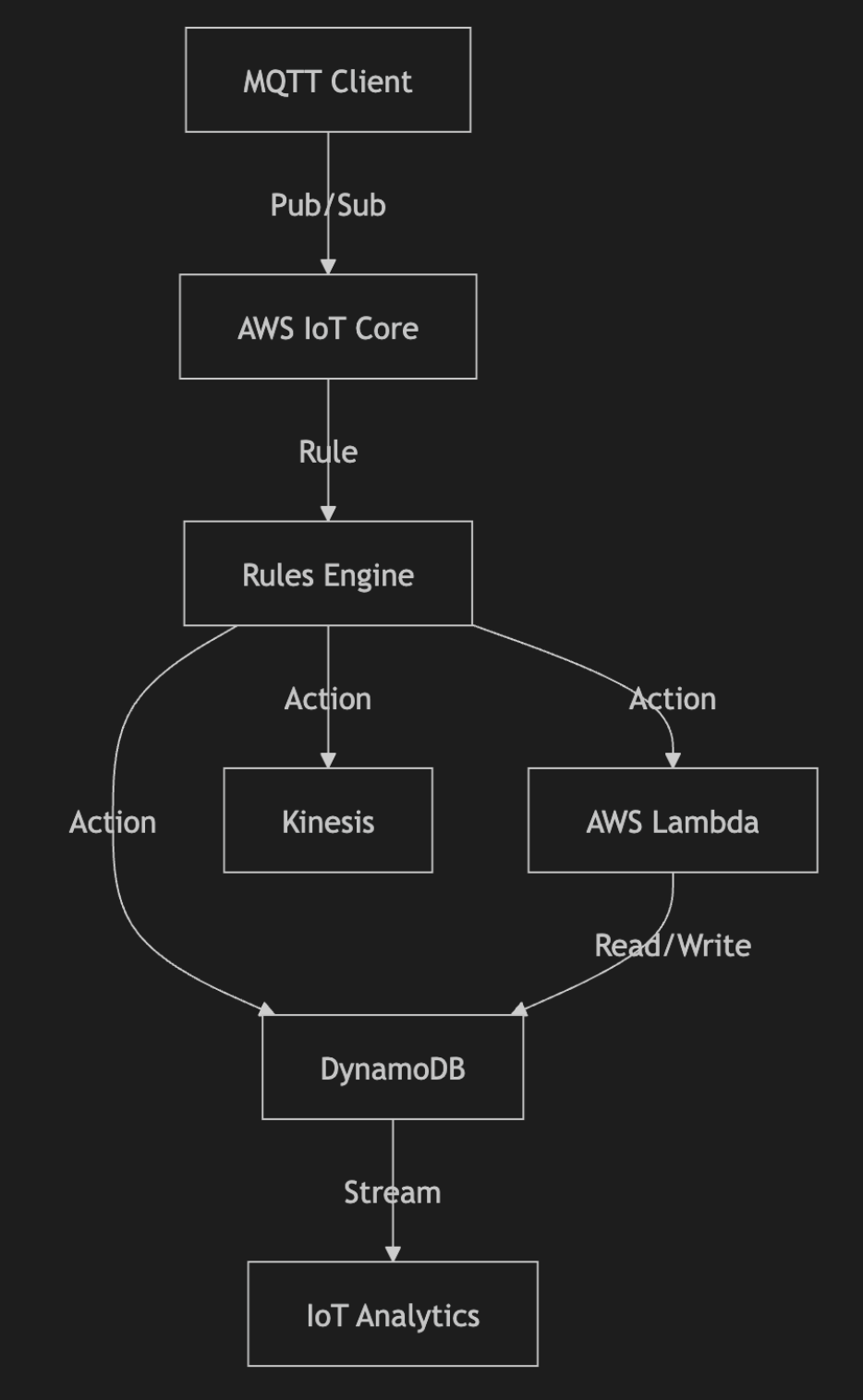
  1. IoT Core: Receives the MQTT message.
  2. Rules Engine: Evaluates SQL-like syntax to decide where to send the data.
  3. IAM: Governs the permissions between the Rule and the destination.
  4. Lambda: Executes custom logic (cold starts, concurrency limits apply).
  5. DynamoDB: Stores the state (requires separate capacity planning/provisioning).
  6. Kinesis: Buffers data if you need downstream analytics.

This architecture forces you to manage the glue between services rather than the value of your application.

Developer Workflow Comparison

The friction of the “AWS primitive” approach becomes obvious when you map out the developer’s journey.

Harper Developer Flow

  • Install: npm install -g harperdb and start the process.
  • Define Schema: Create a table (e.g., sensors) via API or Studio.
  • Connect: Point your MQTT client to the Harper port.
  • Publish/Subscribe: Publish to sensors/1. The data is now stored, indexed, and pushed to all subscribers.
  • Logic (Optional): Add a Harper Application component (e.g., resources.js) to validate or transform data as it is written.
  • Scale: Add a second cluster with Harper Fabric. Data syncs automatically.

Total Steps: ~4

Operational Overhead: Low (One process, one config file).

AWS Developer Flow

  • IAM Setup: Create policies for devices to connect and publish.
  • Certificates: Generate, download, and embed X.509 certificates for every client.
  • IoT Core Config: Set up the Thing Registry.
  • Rules Engine: Write a SQL rule (SELECT * FROM 'sensors/#') to route data.
  • Storage Setup: Create a DynamoDB table. Configure partition/sort keys.
  • IAM (Again): Create a role allowing IoT Core to PutItem to DynamoDB.
  • Compute Setup: Write a Lambda function. Zip it. Upload it.
  • IAM (Again): Create a role allowing Lambda to access necessary resources.
  • Integration: Debug permissions errors between IoT Core, Lambda, and DynamoDB.

Total Steps: 10+

Operational Overhead: High (Multiple services, complex IAM web, certificate management).

Code Examples

The following examples illustrate the code required to achieve a simple goal: Save an incoming MQTT temperature reading to a database and trigger logic.

Harper MQTT Workflow

In Harper, “saving” is implicit. You just publish with the retain flag. Logic is handled by the Harper Application engine.

Here’s an example of a publisher and subscriber in javascript that works for any MQTT system adhering to the OASIS recommendations.

publisher.js (node.js - requires mqtt npm package):

const mqtt = require('mqtt');
const client = mqtt.connect('mqtt://localhost:1883');

client.on('connect', () => {
  // Topic maps directly to the 'sensors' table, record ID '101'
  const topic = 'sensors/101';
  const payload = JSON.stringify({ temp: 72.5, location: 'warehouse' });

  // Retain = true means "Upsert this record to the database"
  client.publish(topic, payload, { retain: true, qos: 1 });
});

subscriber.js (node.js - requires mqtt npm package):

const mqtt = require('mqtt');
const client = mqtt.connect('mqtt://localhost:1883');

client.subscribe('sensors/#');
client.on('message', (topic, message) => {
  // Receives the stored state immediately, then real-time updates
  console.log(`Update on ${topic}:`, message.toString());
});

Harper Application Logic (config.yaml, schema.graplql, resources.js): This runs inside Harper. By defining a table and extending it with a resource, we intercept the write operation triggered by the MQTT publish. The application configuration is how Harper knows where to find these files.

config.yaml

graphqlSchema:
  files: "schema.graphql"
jsResource:
  files: "resources.js"

schema.graphql

type Sensors @table {
    id: ID @primaryKey
    location: String
    temp: Float
}

resources.js

export default class Sensors extends tables.Sensors {
    static loadAsInstance = false; // opt in to updated behavior
    // Intercept the 'put' (upsert) operation
    put(target, data) {
        if (data.temp > 100) {
            // Logic: Trigger an alert or modify data
            console.log(`ALERT: High temperature detected on sensor ${target.id}`);
            data.alert = true;
        }
        // Proceed with the default write to storage
        return super.put(target, data);
    }
}

AWS MQTT Workflow

In AWS, you must wire together the broker, a rule, and a database.

1. IAM Policy (JSON): You must define this to allow the device to connect.

{
  "Version": "2012-10-17",
  "Statement": [
    {
      "Effect": "Allow",
      "Action": "iot:Connect",
      "Resource": "arn:aws:iot:us-east-1:123456789012:client/sensor-1"
    },
    {
      "Effect": "Allow",
      "Action": "iot:Publish",
      "Resource": "arn:aws:iot:us-east-1:123456789012:topic/sensors/101"
    }
  ]
}

2. IoT Rule (SQL):You must configure this in the AWS Console or CLI to route the message.

SELECT * FROM 'sensors/#'

3. DynamoDB Action Configuration:You must configure the rule to write to DynamoDB.

{
    "ruleName": "SaveSensorData",
    "topicRulePayload": {
        "sql": "SELECT * FROM 'sensors/#'",
        "actions": [{
            "dynamoDB": {
                "tableName": "SensorsTable",
                "roleArn": "arn:aws:iam::123456789012:role/IoT_DynamoDB_Role",
                "hashKeyField": "sensorId",
                "hashKeyValue": "${topic(2)}",
                "rangeKeyField": "timestamp",
                "rangeKeyValue": "${timestamp()}"
            }
        }]
    }
}

4. Lambda Function (If custom logic is needed):If you need logic (like the Harper example), you can’t just write to DynamoDB. You must route to Lambda first.

const AWS = require('aws-sdk');
const dynamo = new AWS.DynamoDB.DocumentClient();

exports.handler = async (event) => {
    // Event is the MQTT payload
    if (event.temp > 100) {
        // Trigger alert...
    }
    
    // Now manually write to DB
    await dynamo.put({
        TableName: 'SensorsTable',
        Item: {
            sensorId: event.topic.split('/')[1],
            temp: event.temp,
            timestamp: Date.now()
        }
    }).promise();
};

Contrast: Harper requires 0 lines of infrastructure code to save data and a simple JavaScript class for logic. AWS requires IAM policies, SQL rules, and potentially Lambda code just to persist a message.

Feature Comparison Table

Capability Harper AWS IoT Core MQTT
Real-time Integration Native. Database and Broker are one. Fragmented. Broker is separate from storage/compute.
Data Retention Built-in. retain: true persists to disk forever (or until deleted). Ephemeral. Retained messages are limited. Requires DynamoDB/S3 for true storage.
Application Logic Native. Harper Applications run in-process. Zero latency overhead. External. Requires AWS Lambda (cold starts, per-invocation costs).
Distribution Built-in (Fabric). Peer-to-peer replication via config. Complex. Requires Cross-Region Replication, Global Tables, or custom bridges.
Protocol Support MQTT, WebSocket, REST (all over HTTP/TCP). MQTT, HTTPS, WebSocket.
Complexity Very Low. Single binary, simple config. Very High. Requires mastery of 5+ AWS services.
Cost Model Predictable. Resource-based (RAM/CPU/Storage). Variable. Pay per message, per rule execution, per DB write, per Lambda ms.
Long-term Adaptability High. You own the stack. Easy to extend. Low. Locked into AWS service roadmap and deprecations.

The Cost of Point Solutions

AWS operates on a model of service sprawl. Every new requirement—storage, analysis, routing—is answered with a new billable service. 

  • Need to store the message? Add DynamoDB
  • Need to transform it? Add Lambda
  • Need to analyze a stream? Add Kinesis or IoT Analytics.

This creates a “tax” on innovation. Your architecture becomes brittle, defined by the limitations of the integrations rather than the needs of your application. You spend more time managing IAM roles and debugging service limits than building features.

Harper offers a Unified Architecture. By fusing the database, the broker, and the application server, Harper eliminates the “tax.” 

  • Data is the API.
  • The Broker is the Database.

This stability allows teams to adapt over time. You can start with simple pub/sub, then add persistence, then add distributed logic—all without changing your fundamental architecture or adding a dozen new cloud services.

Conclusion

For teams building real-time, distributed systems, the choice is clear.

AWS IoT Core is a powerful tool if you are already deeply committed to the AWS ecosystem and willing to continuously pay the “complexity tax” over the life of the solution you are building.

Harper, however, is the adaptive, modern choice. It respects your time by providing a complete platform out of the box. It handles the heavy lifting of persistence, distribution, and logic, allowing you to focus on what matters: your data and your users. By choosing Harper, you choose a future where your infrastructure empowers you, rather than entangling you.

Discover why Harper’s unified application platform is the superior choice for real-time systems compared to AWS IoT Core. This technical deep dive explores how Harper fuses MQTT, storage, and logic into a single binary, eliminating the service sprawl, complexity, and cost of the traditional AWS primitive approach.

Executive Summary

In the landscape of distributed systems, the choice between a unified platform and a constellation of point solutions determines not just your architecture, but your team’s velocity and your long-term operational burden.

Harper represents a paradigm shift: a fused application platform where MQTT, database storage, application logic, and distribution are inseparable, native capabilities of a single, lightweight binary. It is designed for developers who need to move data, store it, and act on it immediately, without the friction of integrating disparate services.

AWS IoT Core, conversely, is a classic point solution. It is a robust MQTT broker, but it is only a broker. To achieve persistence, logic, or analysis, it demands a sprawling integration with AWS Lambda, DynamoDB, Kinesis, IAM (Identity and Access Management), and IoT Analytics.

This article demonstrates why Harper’s unified model offers superior adaptability, simplicity, and performance for real-time systems, contrasting it with the operational complexity and service sprawl inherent in the AWS ecosystem.

Architecture Comparison

The fundamental difference lies in the “center of gravity” for your data.

Harper: The Fused Model

Harper collapses the traditional stack. There is no “connector” between your MQTT broker and your database because they are the same entity. Harper’s runtime integrates MQTT, storage, application execution, and global distribution into a single system.

  • Unified Runtime: Harper does not rely on external services for core functionality. The database, the cache, the real-time broker, and the application engine are one.
  • Direct Data Binding: When a message is published to a topic with the retain flag, it is upserted directly into the database. The topic sensors/temp/1 maps 1:1 to a resource path.
  • Harper Applications: Applications run inside Harper’s application engine, allowing developers to process MQTT messages directly within the platform. Logic sits right next to the data, eliminating network hops.
  • Global Distribution (Fabric): Harper nodes form a peer-to-peer mesh. Data published to one node can be automatically replicated to others via efficient, persistent WebSocket connections. This is an active-active distribution out of the box.

AWS: The Fragmented Model

AWS IoT Core is a gateway that holds no state beyond transient “retained messages” (which are volatile and limited). To build a real application, you must construct a pipeline:

  1. IoT Core: Receives the MQTT message.
  2. Rules Engine: Evaluates SQL-like syntax to decide where to send the data.
  3. IAM: Governs the permissions between the Rule and the destination.
  4. Lambda: Executes custom logic (cold starts, concurrency limits apply).
  5. DynamoDB: Stores the state (requires separate capacity planning/provisioning).
  6. Kinesis: Buffers data if you need downstream analytics.

This architecture forces you to manage the glue between services rather than the value of your application.

Developer Workflow Comparison

The friction of the “AWS primitive” approach becomes obvious when you map out the developer’s journey.

Harper Developer Flow

  • Install: npm install -g harperdb and start the process.
  • Define Schema: Create a table (e.g., sensors) via API or Studio.
  • Connect: Point your MQTT client to the Harper port.
  • Publish/Subscribe: Publish to sensors/1. The data is now stored, indexed, and pushed to all subscribers.
  • Logic (Optional): Add a Harper Application component (e.g., resources.js) to validate or transform data as it is written.
  • Scale: Add a second cluster with Harper Fabric. Data syncs automatically.

Total Steps: ~4

Operational Overhead: Low (One process, one config file).

AWS Developer Flow

  • IAM Setup: Create policies for devices to connect and publish.
  • Certificates: Generate, download, and embed X.509 certificates for every client.
  • IoT Core Config: Set up the Thing Registry.
  • Rules Engine: Write a SQL rule (SELECT * FROM 'sensors/#') to route data.
  • Storage Setup: Create a DynamoDB table. Configure partition/sort keys.
  • IAM (Again): Create a role allowing IoT Core to PutItem to DynamoDB.
  • Compute Setup: Write a Lambda function. Zip it. Upload it.
  • IAM (Again): Create a role allowing Lambda to access necessary resources.
  • Integration: Debug permissions errors between IoT Core, Lambda, and DynamoDB.

Total Steps: 10+

Operational Overhead: High (Multiple services, complex IAM web, certificate management).

Code Examples

The following examples illustrate the code required to achieve a simple goal: Save an incoming MQTT temperature reading to a database and trigger logic.

Harper MQTT Workflow

In Harper, “saving” is implicit. You just publish with the retain flag. Logic is handled by the Harper Application engine.

Here’s an example of a publisher and subscriber in javascript that works for any MQTT system adhering to the OASIS recommendations.

publisher.js (node.js - requires mqtt npm package):

const mqtt = require('mqtt');
const client = mqtt.connect('mqtt://localhost:1883');

client.on('connect', () => {
  // Topic maps directly to the 'sensors' table, record ID '101'
  const topic = 'sensors/101';
  const payload = JSON.stringify({ temp: 72.5, location: 'warehouse' });

  // Retain = true means "Upsert this record to the database"
  client.publish(topic, payload, { retain: true, qos: 1 });
});

subscriber.js (node.js - requires mqtt npm package):

const mqtt = require('mqtt');
const client = mqtt.connect('mqtt://localhost:1883');

client.subscribe('sensors/#');
client.on('message', (topic, message) => {
  // Receives the stored state immediately, then real-time updates
  console.log(`Update on ${topic}:`, message.toString());
});

Harper Application Logic (config.yaml, schema.graplql, resources.js): This runs inside Harper. By defining a table and extending it with a resource, we intercept the write operation triggered by the MQTT publish. The application configuration is how Harper knows where to find these files.

config.yaml

graphqlSchema:
  files: "schema.graphql"
jsResource:
  files: "resources.js"

schema.graphql

type Sensors @table {
    id: ID @primaryKey
    location: String
    temp: Float
}

resources.js

export default class Sensors extends tables.Sensors {
    static loadAsInstance = false; // opt in to updated behavior
    // Intercept the 'put' (upsert) operation
    put(target, data) {
        if (data.temp > 100) {
            // Logic: Trigger an alert or modify data
            console.log(`ALERT: High temperature detected on sensor ${target.id}`);
            data.alert = true;
        }
        // Proceed with the default write to storage
        return super.put(target, data);
    }
}

AWS MQTT Workflow

In AWS, you must wire together the broker, a rule, and a database.

1. IAM Policy (JSON): You must define this to allow the device to connect.

{
  "Version": "2012-10-17",
  "Statement": [
    {
      "Effect": "Allow",
      "Action": "iot:Connect",
      "Resource": "arn:aws:iot:us-east-1:123456789012:client/sensor-1"
    },
    {
      "Effect": "Allow",
      "Action": "iot:Publish",
      "Resource": "arn:aws:iot:us-east-1:123456789012:topic/sensors/101"
    }
  ]
}

2. IoT Rule (SQL):You must configure this in the AWS Console or CLI to route the message.

SELECT * FROM 'sensors/#'

3. DynamoDB Action Configuration:You must configure the rule to write to DynamoDB.

{
    "ruleName": "SaveSensorData",
    "topicRulePayload": {
        "sql": "SELECT * FROM 'sensors/#'",
        "actions": [{
            "dynamoDB": {
                "tableName": "SensorsTable",
                "roleArn": "arn:aws:iam::123456789012:role/IoT_DynamoDB_Role",
                "hashKeyField": "sensorId",
                "hashKeyValue": "${topic(2)}",
                "rangeKeyField": "timestamp",
                "rangeKeyValue": "${timestamp()}"
            }
        }]
    }
}

4. Lambda Function (If custom logic is needed):If you need logic (like the Harper example), you can’t just write to DynamoDB. You must route to Lambda first.

const AWS = require('aws-sdk');
const dynamo = new AWS.DynamoDB.DocumentClient();

exports.handler = async (event) => {
    // Event is the MQTT payload
    if (event.temp > 100) {
        // Trigger alert...
    }
    
    // Now manually write to DB
    await dynamo.put({
        TableName: 'SensorsTable',
        Item: {
            sensorId: event.topic.split('/')[1],
            temp: event.temp,
            timestamp: Date.now()
        }
    }).promise();
};

Contrast: Harper requires 0 lines of infrastructure code to save data and a simple JavaScript class for logic. AWS requires IAM policies, SQL rules, and potentially Lambda code just to persist a message.

Feature Comparison Table

Capability Harper AWS IoT Core MQTT
Real-time Integration Native. Database and Broker are one. Fragmented. Broker is separate from storage/compute.
Data Retention Built-in. retain: true persists to disk forever (or until deleted). Ephemeral. Retained messages are limited. Requires DynamoDB/S3 for true storage.
Application Logic Native. Harper Applications run in-process. Zero latency overhead. External. Requires AWS Lambda (cold starts, per-invocation costs).
Distribution Built-in (Fabric). Peer-to-peer replication via config. Complex. Requires Cross-Region Replication, Global Tables, or custom bridges.
Protocol Support MQTT, WebSocket, REST (all over HTTP/TCP). MQTT, HTTPS, WebSocket.
Complexity Very Low. Single binary, simple config. Very High. Requires mastery of 5+ AWS services.
Cost Model Predictable. Resource-based (RAM/CPU/Storage). Variable. Pay per message, per rule execution, per DB write, per Lambda ms.
Long-term Adaptability High. You own the stack. Easy to extend. Low. Locked into AWS service roadmap and deprecations.

The Cost of Point Solutions

AWS operates on a model of service sprawl. Every new requirement—storage, analysis, routing—is answered with a new billable service. 

  • Need to store the message? Add DynamoDB
  • Need to transform it? Add Lambda
  • Need to analyze a stream? Add Kinesis or IoT Analytics.

This creates a “tax” on innovation. Your architecture becomes brittle, defined by the limitations of the integrations rather than the needs of your application. You spend more time managing IAM roles and debugging service limits than building features.

Harper offers a Unified Architecture. By fusing the database, the broker, and the application server, Harper eliminates the “tax.” 

  • Data is the API.
  • The Broker is the Database.

This stability allows teams to adapt over time. You can start with simple pub/sub, then add persistence, then add distributed logic—all without changing your fundamental architecture or adding a dozen new cloud services.

Conclusion

For teams building real-time, distributed systems, the choice is clear.

AWS IoT Core is a powerful tool if you are already deeply committed to the AWS ecosystem and willing to continuously pay the “complexity tax” over the life of the solution you are building.

Harper, however, is the adaptive, modern choice. It respects your time by providing a complete platform out of the box. It handles the heavy lifting of persistence, distribution, and logic, allowing you to focus on what matters: your data and your users. By choosing Harper, you choose a future where your infrastructure empowers you, rather than entangling you.

Harper’s unified application platform fuses MQTT, database storage, and real-time logic into one high-performance runtime—eliminating AWS service sprawl, IAM complexity, and Lambda overhead. For real-time systems, Harper delivers simpler architectures, lower latency, reduced costs, and faster developer velocity compared to fragmented AWS IoT Core solutions.

Download

White arrow pointing right
Harper’s unified application platform fuses MQTT, database storage, and real-time logic into one high-performance runtime—eliminating AWS service sprawl, IAM complexity, and Lambda overhead. For real-time systems, Harper delivers simpler architectures, lower latency, reduced costs, and faster developer velocity compared to fragmented AWS IoT Core solutions.

Download

White arrow pointing right
Harper’s unified application platform fuses MQTT, database storage, and real-time logic into one high-performance runtime—eliminating AWS service sprawl, IAM complexity, and Lambda overhead. For real-time systems, Harper delivers simpler architectures, lower latency, reduced costs, and faster developer velocity compared to fragmented AWS IoT Core solutions.

Download

White arrow pointing right

Explore Recent Resources

Tutorial
GitHub Logo

The Easiest Way to Use MQTT: A Hands-On Demo with Harper’s Built-In Broker

Learn how MQTT works and see a real-time demo using Harper’s built-in MQTT broker. Discover topics, Pub/Sub, QoS, retained messages, and how Harper simplifies IoT and edge data workflows. Watch how to publish, subscribe, and store sensor data instantly with an easy, developer-friendly setup.
Harper Learn
Tutorial
Learn how MQTT works and see a real-time demo using Harper’s built-in MQTT broker. Discover topics, Pub/Sub, QoS, retained messages, and how Harper simplifies IoT and edge data workflows. Watch how to publish, subscribe, and store sensor data instantly with an easy, developer-friendly setup.
A man with short dark hair, glasses, and a goatee smiles slightly, wearing a black shirt in front of a nature background.
Ivan R. Judson, Ph.D.
Distinguished Solution Architect
Tutorial

The Easiest Way to Use MQTT: A Hands-On Demo with Harper’s Built-In Broker

Learn how MQTT works and see a real-time demo using Harper’s built-in MQTT broker. Discover topics, Pub/Sub, QoS, retained messages, and how Harper simplifies IoT and edge data workflows. Watch how to publish, subscribe, and store sensor data instantly with an easy, developer-friendly setup.
Ivan R. Judson, Ph.D.
Dec 2025
Tutorial

The Easiest Way to Use MQTT: A Hands-On Demo with Harper’s Built-In Broker

Learn how MQTT works and see a real-time demo using Harper’s built-in MQTT broker. Discover topics, Pub/Sub, QoS, retained messages, and how Harper simplifies IoT and edge data workflows. Watch how to publish, subscribe, and store sensor data instantly with an easy, developer-friendly setup.
Ivan R. Judson, Ph.D.
Tutorial

The Easiest Way to Use MQTT: A Hands-On Demo with Harper’s Built-In Broker

Learn how MQTT works and see a real-time demo using Harper’s built-in MQTT broker. Discover topics, Pub/Sub, QoS, retained messages, and how Harper simplifies IoT and edge data workflows. Watch how to publish, subscribe, and store sensor data instantly with an easy, developer-friendly setup.
Ivan R. Judson, Ph.D.
Comparison
GitHub Logo

Harper vs. AWS IoT Core: Why Unified Architectures Win for Real-Time Systems

Harper’s unified application platform fuses MQTT, database storage, and real-time logic into one high-performance runtime—eliminating AWS service sprawl, IAM complexity, and Lambda overhead. For real-time systems, Harper delivers simpler architectures, lower latency, reduced costs, and faster developer velocity compared to fragmented AWS IoT Core solutions.
Comparison
Harper’s unified application platform fuses MQTT, database storage, and real-time logic into one high-performance runtime—eliminating AWS service sprawl, IAM complexity, and Lambda overhead. For real-time systems, Harper delivers simpler architectures, lower latency, reduced costs, and faster developer velocity compared to fragmented AWS IoT Core solutions.
A man with short dark hair, glasses, and a goatee smiles slightly, wearing a black shirt in front of a nature background.
Ivan R. Judson, Ph.D.
Distinguished Solution Architect
Comparison

Harper vs. AWS IoT Core: Why Unified Architectures Win for Real-Time Systems

Harper’s unified application platform fuses MQTT, database storage, and real-time logic into one high-performance runtime—eliminating AWS service sprawl, IAM complexity, and Lambda overhead. For real-time systems, Harper delivers simpler architectures, lower latency, reduced costs, and faster developer velocity compared to fragmented AWS IoT Core solutions.
Ivan R. Judson, Ph.D.
Dec 2025
Comparison

Harper vs. AWS IoT Core: Why Unified Architectures Win for Real-Time Systems

Harper’s unified application platform fuses MQTT, database storage, and real-time logic into one high-performance runtime—eliminating AWS service sprawl, IAM complexity, and Lambda overhead. For real-time systems, Harper delivers simpler architectures, lower latency, reduced costs, and faster developer velocity compared to fragmented AWS IoT Core solutions.
Ivan R. Judson, Ph.D.
Comparison

Harper vs. AWS IoT Core: Why Unified Architectures Win for Real-Time Systems

Harper’s unified application platform fuses MQTT, database storage, and real-time logic into one high-performance runtime—eliminating AWS service sprawl, IAM complexity, and Lambda overhead. For real-time systems, Harper delivers simpler architectures, lower latency, reduced costs, and faster developer velocity compared to fragmented AWS IoT Core solutions.
Ivan R. Judson, Ph.D.
Tutorial
GitHub Logo

Harper + Docker + Grafana: Local Setup Guide

Learn how to set up Harper locally using Docker and monitor everything with Grafana. This step-by-step walkthrough shows developers how to launch single-node and clustered Harper environments, deploy the application template, and start building fast. Perfect for anyone exploring high-performance development with Harper’s distributed platform.
Harper Learn
Tutorial
Learn how to set up Harper locally using Docker and monitor everything with Grafana. This step-by-step walkthrough shows developers how to launch single-node and clustered Harper environments, deploy the application template, and start building fast. Perfect for anyone exploring high-performance development with Harper’s distributed platform.
A man with short dark hair, glasses, and a goatee smiles slightly, wearing a black shirt in front of a nature background.
Ivan R. Judson, Ph.D.
Distinguished Solution Architect
Tutorial

Harper + Docker + Grafana: Local Setup Guide

Learn how to set up Harper locally using Docker and monitor everything with Grafana. This step-by-step walkthrough shows developers how to launch single-node and clustered Harper environments, deploy the application template, and start building fast. Perfect for anyone exploring high-performance development with Harper’s distributed platform.
Ivan R. Judson, Ph.D.
Dec 2025
Tutorial

Harper + Docker + Grafana: Local Setup Guide

Learn how to set up Harper locally using Docker and monitor everything with Grafana. This step-by-step walkthrough shows developers how to launch single-node and clustered Harper environments, deploy the application template, and start building fast. Perfect for anyone exploring high-performance development with Harper’s distributed platform.
Ivan R. Judson, Ph.D.
Tutorial

Harper + Docker + Grafana: Local Setup Guide

Learn how to set up Harper locally using Docker and monitor everything with Grafana. This step-by-step walkthrough shows developers how to launch single-node and clustered Harper environments, deploy the application template, and start building fast. Perfect for anyone exploring high-performance development with Harper’s distributed platform.
Ivan R. Judson, Ph.D.