



Click Below to Get the Code

Browse, clone, and build from real-world templates powered by Harper.
Blog
GitHub Logo

How Redirects and Early Hints Shape the First Impression (Akamai + Harper)

When a user taps a link, Harper and Akamai work in tandem to instantly determine the optimal destination and start loading assets—before the page even begins rendering. By combining ultra-fast distributed redirects with Early Hints, this system delivers a seamless, high-performance experience that feels instantaneous to the end user.
Blog

How Redirects and Early Hints Shape the First Impression (Akamai + Harper)

By
Aleks Haugom
August 12, 2025
By
Aleks Haugom
August 12, 2025
By
Aleks Haugom
August 12, 2025
August 12, 2025
When a user taps a link, Harper and Akamai work in tandem to instantly determine the optimal destination and start loading assets—before the page even begins rendering. By combining ultra-fast distributed redirects with Early Hints, this system delivers a seamless, high-performance experience that feels instantaneous to the end user.
Aleks Haugom
Senior Manager of GTM & Marketing

Every great user experience begins before the page loads.

The moment a user taps a link—whether from a Google ad, an email campaign, or a stale bookmark—a flurry of decisions and optimizations happen invisibly across the edge and deep inside distributed systems. Most of the time, the user simply sees a fast page. But under the hood, something more elegant is happening: a tiny choreography between Akamai and Harper that ensures they land in the right place, as quickly as possible.

This is the story of how redirects and Early Hints—two deceptively simple concepts—can shape a user’s first impression, and how Harper’s Platform turns this pattern into a high-performance dance.

The Race to First Paint

Let’s start with a real-world scenario. A user taps www.customer.com, maybe expecting a storefront or a dashboard. It’s a routine interaction, but behind that tap, a chain of network events begins. The request flows to the nearest Akamai edge node, where a decision needs to be made: do we serve them this site, or redirect them to a more suitable location?

This is where the redirect logic kicks in. Akamai’s EdgeWorker quickly consults Harper’s distributed redirect service. Because redirect rules are already replicated across global Harper nodes, the answer is near-instant, usually finalized in one millisecond or less. For perspective, this could be 10 times slower, and it would still be imperceptible to a human. The system either returns a 301/302 or proceeds to the origin without missing a beat.

Then, after the redirect decision is finalized, another optimization kicks in: Early Hints.

Before the origin server begins assembling the full response, Harper has already looked up metadata about the requested page from the same node as the redirects. This node holds information about critical resources—scripts, fonts, stylesheets, largest contentful image—and generates a 103 Early Hint telling the browser, “You’re going to need these; start loading them now.”

This happens before the page has even been built. And because the browser now knows what to fetch from the CDN while the origin server is still working, rendering can begin sooner. That’s the beauty of the model: routing and rendering paths are optimized in parallel, with each decision delegated to the part of the stack closest to the user.

💡 Want a deeper dive on how Early Hints work with preload and preconnect? Check out this guide on Harper’s Dev Center.
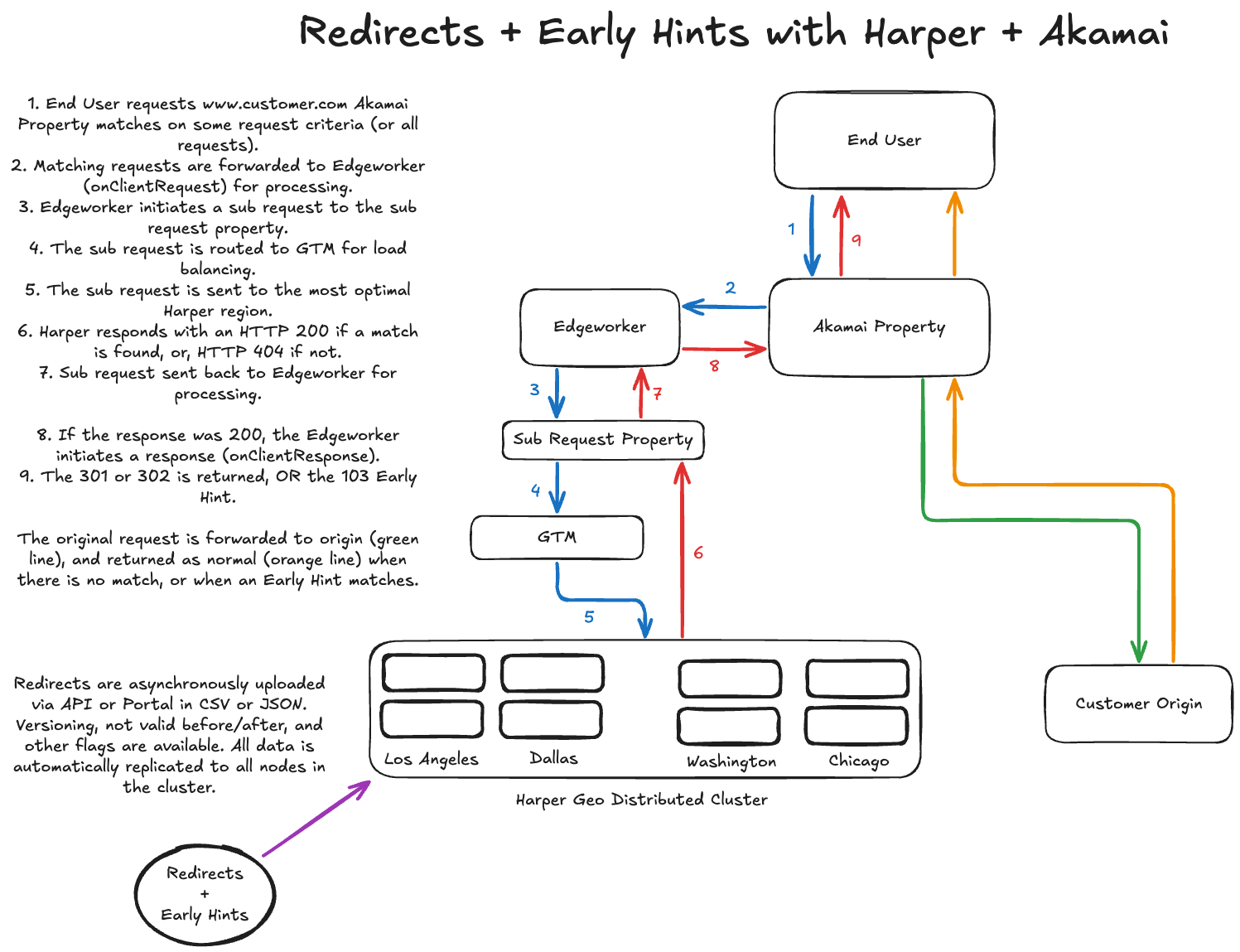
Redirects and Early Hints with Harper + Akamai (System Flow).

The Split‑Second Decision Tree

As the visual shows, the first stop is Akamai Property configuration—where all requests are evaluated against criteria you define. If a match is found, the request is handed to an EdgeWorker, a lightweight compute layer at the edge.

This EdgeWorker is where the real optimization starts. It doesn’t just forward the request blindly—it runs logic (onClientRequest) that issues a sub‑request to a Harper endpoint, asking: “Does this URL have a redirect rule?”

The sub‑request travels through Akamai’s GTM (Global Traffic Management) service to reach the most optimal Harper region—Los Angeles, Dallas, Washington, or Chicago in this example. The selected Harper node checks for a redirect match and responds quickly:

  • HTTP 200 if a matching redirect is found
  • HTTP 404 if no match exists

If the result is 200, the EdgeWorker fires off its final response (onClientResponse), returning either a 301/302 redirect, or—if applicable—a 103 Early Hint header that primes the browser to begin rendering early.

💡 Curious about how EdgeWorkers handle these sub‑requests

Early Hints: The Performance Hack You Didn’t Know You Needed

Once the redirect decision is complete, the next phase kicks in: delivering the page from the origin. But before that full response is even ready, Harper enables a subtle but powerful performance boost.

At this point, Harper generates a 103 Early Hint, a response that includes preload instructions for the browser. These hints specify which assets (like images, fonts, or scripts) are likely to be needed so the browser can begin fetching them right away.

The impact is significant: rather than waiting for the origin server to fully render the page before knowing what to load, the browser is already pulling assets from the CDN in parallel. In real-world scenarios, this can accelerate time to first paint or largest content paint by over a second, depending on the speed of the system before early hints were applied.

By decoupling resource loading from full page rendering, Harper helps Akamai shift more of the loading experience earlier in the lifecycle—turning wait time into active work.

Distributed Intelligence: Harper’s Global Layer

So why is Harper even in the picture? Because managing redirects is more than just logic. It’s data—data that needs to be:

  • Instantly available across geographies
  • Versioned for rollback or expiration
  • Replicated without inconsistency

Plus, most redirect systems often have hard limits on the number of redirects they can manage. Many limit teams to 300,000 redirects or fewer. Harper does not have that limit, enabling single-digit millisecond redirect resolution even with upwards of a billion redirects under management.

Harper’s redirect engine is built for this. When you push a new redirect rule, via API or UI, it’s automatically propagated to every node in the cluster. Whether your user is in Berlin or San Francisco, the EdgeWorker gets a consistent, fast answer.

The Invisible Win

Here’s what the user experiences: they click a link, and the page just loads. No delay, no flash of white, no waiting on assets. The redirect, if needed, was invisible. And thanks to Early Hints, the browser started painting before it even knew where it was going.

Under the hood, Akamai made a smart sub‑request to Harper, got a fast answer, and returned the right redirect and the right hint at the right time. No origin load, no unnecessary overhead.

This pattern, redirects + Early Hints, backed by distributed logic, isn’t just for edge nerds. It’s how we make global apps feel local, and how Harper ensures the first impression is always the right one.


Every great user experience begins before the page loads.

The moment a user taps a link—whether from a Google ad, an email campaign, or a stale bookmark—a flurry of decisions and optimizations happen invisibly across the edge and deep inside distributed systems. Most of the time, the user simply sees a fast page. But under the hood, something more elegant is happening: a tiny choreography between Akamai and Harper that ensures they land in the right place, as quickly as possible.

This is the story of how redirects and Early Hints—two deceptively simple concepts—can shape a user’s first impression, and how Harper’s Platform turns this pattern into a high-performance dance.

The Race to First Paint

Let’s start with a real-world scenario. A user taps www.customer.com, maybe expecting a storefront or a dashboard. It’s a routine interaction, but behind that tap, a chain of network events begins. The request flows to the nearest Akamai edge node, where a decision needs to be made: do we serve them this site, or redirect them to a more suitable location?

This is where the redirect logic kicks in. Akamai’s EdgeWorker quickly consults Harper’s distributed redirect service. Because redirect rules are already replicated across global Harper nodes, the answer is near-instant, usually finalized in one millisecond or less. For perspective, this could be 10 times slower, and it would still be imperceptible to a human. The system either returns a 301/302 or proceeds to the origin without missing a beat.

Then, after the redirect decision is finalized, another optimization kicks in: Early Hints.

Before the origin server begins assembling the full response, Harper has already looked up metadata about the requested page from the same node as the redirects. This node holds information about critical resources—scripts, fonts, stylesheets, largest contentful image—and generates a 103 Early Hint telling the browser, “You’re going to need these; start loading them now.”

This happens before the page has even been built. And because the browser now knows what to fetch from the CDN while the origin server is still working, rendering can begin sooner. That’s the beauty of the model: routing and rendering paths are optimized in parallel, with each decision delegated to the part of the stack closest to the user.

💡 Want a deeper dive on how Early Hints work with preload and preconnect? Check out this guide on Harper’s Dev Center.
Redirects and Early Hints with Harper + Akamai (System Flow).

The Split‑Second Decision Tree

As the visual shows, the first stop is Akamai Property configuration—where all requests are evaluated against criteria you define. If a match is found, the request is handed to an EdgeWorker, a lightweight compute layer at the edge.

This EdgeWorker is where the real optimization starts. It doesn’t just forward the request blindly—it runs logic (onClientRequest) that issues a sub‑request to a Harper endpoint, asking: “Does this URL have a redirect rule?”

The sub‑request travels through Akamai’s GTM (Global Traffic Management) service to reach the most optimal Harper region—Los Angeles, Dallas, Washington, or Chicago in this example. The selected Harper node checks for a redirect match and responds quickly:

  • HTTP 200 if a matching redirect is found
  • HTTP 404 if no match exists

If the result is 200, the EdgeWorker fires off its final response (onClientResponse), returning either a 301/302 redirect, or—if applicable—a 103 Early Hint header that primes the browser to begin rendering early.

💡 Curious about how EdgeWorkers handle these sub‑requests

Early Hints: The Performance Hack You Didn’t Know You Needed

Once the redirect decision is complete, the next phase kicks in: delivering the page from the origin. But before that full response is even ready, Harper enables a subtle but powerful performance boost.

At this point, Harper generates a 103 Early Hint, a response that includes preload instructions for the browser. These hints specify which assets (like images, fonts, or scripts) are likely to be needed so the browser can begin fetching them right away.

The impact is significant: rather than waiting for the origin server to fully render the page before knowing what to load, the browser is already pulling assets from the CDN in parallel. In real-world scenarios, this can accelerate time to first paint or largest content paint by over a second, depending on the speed of the system before early hints were applied.

By decoupling resource loading from full page rendering, Harper helps Akamai shift more of the loading experience earlier in the lifecycle—turning wait time into active work.

Distributed Intelligence: Harper’s Global Layer

So why is Harper even in the picture? Because managing redirects is more than just logic. It’s data—data that needs to be:

  • Instantly available across geographies
  • Versioned for rollback or expiration
  • Replicated without inconsistency

Plus, most redirect systems often have hard limits on the number of redirects they can manage. Many limit teams to 300,000 redirects or fewer. Harper does not have that limit, enabling single-digit millisecond redirect resolution even with upwards of a billion redirects under management.

Harper’s redirect engine is built for this. When you push a new redirect rule, via API or UI, it’s automatically propagated to every node in the cluster. Whether your user is in Berlin or San Francisco, the EdgeWorker gets a consistent, fast answer.

The Invisible Win

Here’s what the user experiences: they click a link, and the page just loads. No delay, no flash of white, no waiting on assets. The redirect, if needed, was invisible. And thanks to Early Hints, the browser started painting before it even knew where it was going.

Under the hood, Akamai made a smart sub‑request to Harper, got a fast answer, and returned the right redirect and the right hint at the right time. No origin load, no unnecessary overhead.

This pattern, redirects + Early Hints, backed by distributed logic, isn’t just for edge nerds. It’s how we make global apps feel local, and how Harper ensures the first impression is always the right one.

When a user taps a link, Harper and Akamai work in tandem to instantly determine the optimal destination and start loading assets—before the page even begins rendering. By combining ultra-fast distributed redirects with Early Hints, this system delivers a seamless, high-performance experience that feels instantaneous to the end user.

Download

White arrow pointing right
When a user taps a link, Harper and Akamai work in tandem to instantly determine the optimal destination and start loading assets—before the page even begins rendering. By combining ultra-fast distributed redirects with Early Hints, this system delivers a seamless, high-performance experience that feels instantaneous to the end user.

Download

White arrow pointing right
When a user taps a link, Harper and Akamai work in tandem to instantly determine the optimal destination and start loading assets—before the page even begins rendering. By combining ultra-fast distributed redirects with Early Hints, this system delivers a seamless, high-performance experience that feels instantaneous to the end user.

Download

White arrow pointing right

Explore Recent Resources

Tutorial
GitHub Logo

Real-Time Pub/Sub Without the Stack

Explore a real-time pub/sub architecture where MQTT, WebSockets, Server-Sent Events, and REST work together with persistent data storage in one end-to-end system, enabling real-time interoperability, stateful messaging, and simplified service-to-device and browser communication.
Harper Learn
Tutorial
Explore a real-time pub/sub architecture where MQTT, WebSockets, Server-Sent Events, and REST work together with persistent data storage in one end-to-end system, enabling real-time interoperability, stateful messaging, and simplified service-to-device and browser communication.
A man with short dark hair, glasses, and a goatee smiles slightly, wearing a black shirt in front of a nature background.
Ivan R. Judson, Ph.D.
Distinguished Solution Architect
Tutorial

Real-Time Pub/Sub Without the Stack

Explore a real-time pub/sub architecture where MQTT, WebSockets, Server-Sent Events, and REST work together with persistent data storage in one end-to-end system, enabling real-time interoperability, stateful messaging, and simplified service-to-device and browser communication.
Ivan R. Judson, Ph.D.
Jan 2026
Tutorial

Real-Time Pub/Sub Without the Stack

Explore a real-time pub/sub architecture where MQTT, WebSockets, Server-Sent Events, and REST work together with persistent data storage in one end-to-end system, enabling real-time interoperability, stateful messaging, and simplified service-to-device and browser communication.
Ivan R. Judson, Ph.D.
Tutorial

Real-Time Pub/Sub Without the Stack

Explore a real-time pub/sub architecture where MQTT, WebSockets, Server-Sent Events, and REST work together with persistent data storage in one end-to-end system, enabling real-time interoperability, stateful messaging, and simplified service-to-device and browser communication.
Ivan R. Judson, Ph.D.
News
GitHub Logo

Harper Recognized on Built In’s 2026 Best Places to Work in Colorado Lists

Harper is honored as a Built In 2026 Best Startup to Work For and Best Place to Work in Colorado, recognizing its people-first culture, strong employee experience, and values of accountability, authenticity, empowerment, focus, and transparency that help teams thrive and grow together.
Announcement
News
Harper is honored as a Built In 2026 Best Startup to Work For and Best Place to Work in Colorado, recognizing its people-first culture, strong employee experience, and values of accountability, authenticity, empowerment, focus, and transparency that help teams thrive and grow together.
Colorful geometric illustration of a dog's head resembling folded paper art in shades of teal and pink.
Harper
News

Harper Recognized on Built In’s 2026 Best Places to Work in Colorado Lists

Harper is honored as a Built In 2026 Best Startup to Work For and Best Place to Work in Colorado, recognizing its people-first culture, strong employee experience, and values of accountability, authenticity, empowerment, focus, and transparency that help teams thrive and grow together.
Harper
Jan 2026
News

Harper Recognized on Built In’s 2026 Best Places to Work in Colorado Lists

Harper is honored as a Built In 2026 Best Startup to Work For and Best Place to Work in Colorado, recognizing its people-first culture, strong employee experience, and values of accountability, authenticity, empowerment, focus, and transparency that help teams thrive and grow together.
Harper
News

Harper Recognized on Built In’s 2026 Best Places to Work in Colorado Lists

Harper is honored as a Built In 2026 Best Startup to Work For and Best Place to Work in Colorado, recognizing its people-first culture, strong employee experience, and values of accountability, authenticity, empowerment, focus, and transparency that help teams thrive and grow together.
Harper
Comparison
GitHub Logo

Harper vs. Standard Microservices: Performance Comparison Benchmark

A detailed performance benchmark comparing a traditional microservices architecture with Harper’s unified runtime. Using a real, fully functional e-commerce application, this report examines latency, scalability, and architectural overhead across homepage, category, and product pages, highlighting the real-world performance implications between two different styles of distributed systems.
Comparison
A detailed performance benchmark comparing a traditional microservices architecture with Harper’s unified runtime. Using a real, fully functional e-commerce application, this report examines latency, scalability, and architectural overhead across homepage, category, and product pages, highlighting the real-world performance implications between two different styles of distributed systems.
Person with short dark hair and moustache, wearing a colorful plaid shirt, smiling outdoors in a forested mountain landscape.
Aleks Haugom
Senior Manager of GTM & Marketing
Comparison

Harper vs. Standard Microservices: Performance Comparison Benchmark

A detailed performance benchmark comparing a traditional microservices architecture with Harper’s unified runtime. Using a real, fully functional e-commerce application, this report examines latency, scalability, and architectural overhead across homepage, category, and product pages, highlighting the real-world performance implications between two different styles of distributed systems.
Aleks Haugom
Dec 2025
Comparison

Harper vs. Standard Microservices: Performance Comparison Benchmark

A detailed performance benchmark comparing a traditional microservices architecture with Harper’s unified runtime. Using a real, fully functional e-commerce application, this report examines latency, scalability, and architectural overhead across homepage, category, and product pages, highlighting the real-world performance implications between two different styles of distributed systems.
Aleks Haugom
Comparison

Harper vs. Standard Microservices: Performance Comparison Benchmark

A detailed performance benchmark comparing a traditional microservices architecture with Harper’s unified runtime. Using a real, fully functional e-commerce application, this report examines latency, scalability, and architectural overhead across homepage, category, and product pages, highlighting the real-world performance implications between two different styles of distributed systems.
Aleks Haugom
Tutorial
GitHub Logo

A Simpler Real-Time Messaging Architecture with MQTT, WebSockets, and SSE

Learn how to build a unified real-time backbone using Harper with MQTT, WebSockets, and Server-Sent Events. This guide shows how to broker messages, fan out real-time data, and persist events in one runtime—simplifying real-time system architecture for IoT, dashboards, and event-driven applications.
Harper Learn
Tutorial
Learn how to build a unified real-time backbone using Harper with MQTT, WebSockets, and Server-Sent Events. This guide shows how to broker messages, fan out real-time data, and persist events in one runtime—simplifying real-time system architecture for IoT, dashboards, and event-driven applications.
A man with short dark hair, glasses, and a goatee smiles slightly, wearing a black shirt in front of a nature background.
Ivan R. Judson, Ph.D.
Distinguished Solution Architect
Tutorial

A Simpler Real-Time Messaging Architecture with MQTT, WebSockets, and SSE

Learn how to build a unified real-time backbone using Harper with MQTT, WebSockets, and Server-Sent Events. This guide shows how to broker messages, fan out real-time data, and persist events in one runtime—simplifying real-time system architecture for IoT, dashboards, and event-driven applications.
Ivan R. Judson, Ph.D.
Dec 2025
Tutorial

A Simpler Real-Time Messaging Architecture with MQTT, WebSockets, and SSE

Learn how to build a unified real-time backbone using Harper with MQTT, WebSockets, and Server-Sent Events. This guide shows how to broker messages, fan out real-time data, and persist events in one runtime—simplifying real-time system architecture for IoT, dashboards, and event-driven applications.
Ivan R. Judson, Ph.D.
Tutorial

A Simpler Real-Time Messaging Architecture with MQTT, WebSockets, and SSE

Learn how to build a unified real-time backbone using Harper with MQTT, WebSockets, and Server-Sent Events. This guide shows how to broker messages, fan out real-time data, and persist events in one runtime—simplifying real-time system architecture for IoT, dashboards, and event-driven applications.
Ivan R. Judson, Ph.D.
Podcast
GitHub Logo

Turn Browsing into Buying with Edge AI

Discover how Harper’s latest features streamline development, boost performance, and simplify integration. This technical showcase breaks down real-world workflows, powerful updates, and practical tips for building faster, smarter applications.
Select*
Podcast
Discover how Harper’s latest features streamline development, boost performance, and simplify integration. This technical showcase breaks down real-world workflows, powerful updates, and practical tips for building faster, smarter applications.
Person with short hair wearing a light blue patterned shirt, smiling widely outdoors with blurred greenery and trees in the background.
Austin Akers
Head of Developer Relations
Podcast

Turn Browsing into Buying with Edge AI

Discover how Harper’s latest features streamline development, boost performance, and simplify integration. This technical showcase breaks down real-world workflows, powerful updates, and practical tips for building faster, smarter applications.
Austin Akers
Dec 2025
Podcast

Turn Browsing into Buying with Edge AI

Discover how Harper’s latest features streamline development, boost performance, and simplify integration. This technical showcase breaks down real-world workflows, powerful updates, and practical tips for building faster, smarter applications.
Austin Akers
Podcast

Turn Browsing into Buying with Edge AI

Discover how Harper’s latest features streamline development, boost performance, and simplify integration. This technical showcase breaks down real-world workflows, powerful updates, and practical tips for building faster, smarter applications.
Austin Akers